Blog Details
Home Blog Details

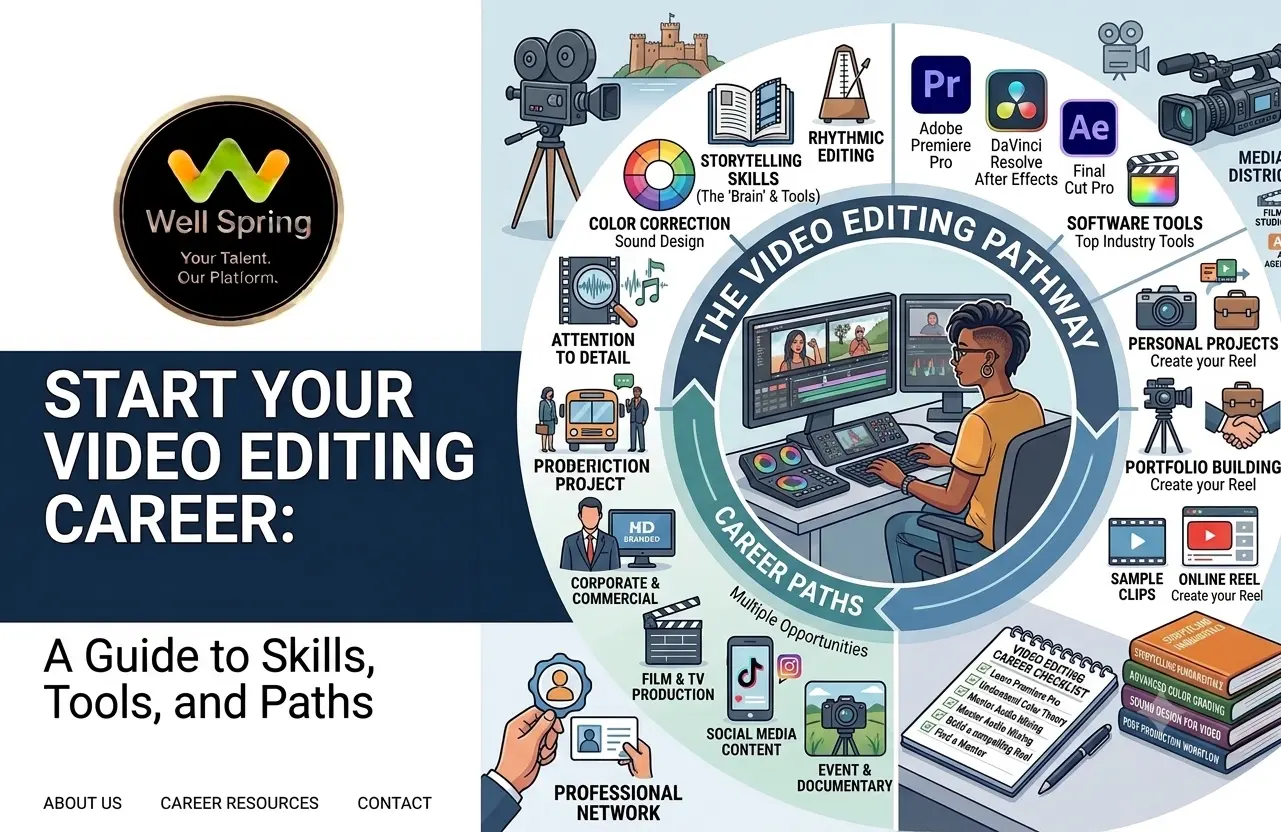
Video has become an important way for businesses, creators, educational institutions, brands, and media teams to communicate with their audiences. As a result, video editing is no longer limited to films and television. Editors now work on Instagram Reels, YouTube videos, advertisements, corporate content, podcasts, product videos, educational content, and digital campaigns.
But learning editing software alone does not create a sustainable career. A strong video editor career path combines technical editing ability with storytelling, pacing, audio, colour, visual communication, portfolio development, and real project experience.
For beginners, the biggest question is often where to start. This guide explains the skills, tools, career opportunities, portfolio requirements, and practical steps you can follow to build a career in video editing—including opportunities for video editing for freshers in Trichy.
A video editor career path typically begins with learning editing fundamentals, mastering one professional editing tool, practising on different types of content, building a portfolio, gaining practical experience, and applying for entry-level roles. In Trichy, current listings show opportunities across social media, YouTube, marketing, corporate, and digital content, with some employers explicitly considering freshers who can demonstrate strong editing work.
Career Path:
Learn → Practise → Build a Portfolio → Gain Experience → Specialise → Apply → Grow
A video editor career path is the progression from learning basic editing concepts to handling professional projects and eventually developing expertise in a specific area of video production.
A beginner might start by learning how to cut footage, arrange clips, add music, create titles, and export videos. With experience, the role can expand into colour correction, sound design, motion graphics, storytelling, platform-specific editing, client communication, and post-production management.
The important distinction is that professional editing is not simply about adding effects. An editor has to decide what the audience should see, when they should see it, and how each visual and sound element supports the story.
Modern editing platforms increasingly combine traditional editing with AI-assisted workflows. Adobe Premiere, for example, currently includes features such as text-based editing, AI-powered footage search, object masking, speech enhancement, colour tools, motion graphics, and automated workflows.
|
Stage |
Main Focus |
|
Beginner |
Editing fundamentals |
|
Junior |
Professional software + small projects |
|
Entry-level |
Portfolio + real client/team work |
|
Intermediate |
Specialisation + faster workflows |
|
Advanced |
Creative direction + complex projects |
|
Senior/Freelance |
Client management + leadership |
Video editing offers several possible career directions because video is used across many industries.
Editors can work with:
This means you do not necessarily have to follow a traditional film-industry career path.
A video editor may work as:
The right option depends on your experience, portfolio, preferred work style, and specialisation.
Modern editing workflows increasingly involve automation and AI-assisted features. These tools can reduce repetitive work, but creative decisions still require human judgement.
For example, AI can help locate footage, generate transcripts, remove unwanted pauses, or improve dialogue, while the editor still determines whether a cut improves the story and whether the pacing works for the intended audience.
Practical takeaway: Learn AI-assisted workflows, but build your career around editing judgement rather than depending entirely on automated effects.
A successful editor needs a combination of technical, creative, and professional skills.
Start with:
These fundamentals form the foundation for almost every type of editing project.
A technically clean video can still feel boring if the story is weak.
You should learn to:
Pacing determines how quickly the audience receives information.
A promotional Reel may require rapid cuts, while an interview may need longer shots that allow the speaker's message to breathe.
The right pace depends on:
Content type + audience + platform + purpose
Good visuals cannot compensate for distracting audio.
Learn:
Learn the difference between correcting footage and creating a visual style.
Basic colour skills include:
Basic motion graphics can make you more versatile.
Learn to create:
A video created for YouTube may not work in the same format on Instagram.
Understand:
Professional editors rarely work completely alone.
You may need to understand a brief, receive revisions, clarify expectations, manage deadlines, and explain creative decisions.
Learn to organise:
A creative editor who repeatedly loses files or delivers the wrong version creates unnecessary problems for a production team.
You do not need to master every editing application at the beginning. Choose one primary tool, learn it properly, and expand later.
Adobe Premiere is widely used for professional video editing and currently provides tools for editing, colour, audio, captions, effects, motion graphics, AI-assisted workflows, and collaboration.
It is useful for learners who want to explore:
DaVinci Resolve combines editing, colour correction, visual effects, motion graphics, and audio post-production within one application. Its free version also provides a substantial set of professional editing capabilities.
It can be a practical starting point for learners who want to explore professional workflows without immediately investing in multiple applications.
After Effects is particularly useful when your career direction involves:
Beginner-friendly applications can be useful for learning basic concepts and producing short-form content. However, if your goal is a long-term professional career, gradually move beyond templates and learn deeper editing principles.
Important: Software is a tool. Your portfolio should demonstrate what you can create with it.
Instead of trying to learn everything simultaneously, follow a progression.
Start with:
Do not rush into advanced effects before you can create a clean, well-paced edit.
Edit more than one type of video.
For example:
Project 1: Instagram Reel
Project 2: YouTube interview
Project 3: Product advertisement
Project 4: Corporate video
Project 5: Event highlight
Project 6: Educational video
This helps you discover which type of editing you enjoy and where your strengths lie.
Choose a well-edited video and analyse:
Then recreate the editing approach using your own footage.
This develops judgement rather than just software familiarity.
After practice recreations, create original work.
For example, create a 30-second product advertisement for a fictional brand.
Give yourself a brief:
“Create a short promotional video for a local coffee shop targeting college students.”
Then decide:
This makes the project much closer to a real client assignment.
Your portfolio should show your strongest work rather than every video you have ever edited.
Include different skills:
Look for:
Practical experience teaches you things tutorials cannot fully simulate, such as revisions, deadlines, briefs, file management, and client expectations.
Once you have a portfolio, start applying for:
Your portfolio can be particularly important when formal experience is limited.
Video editing can lead to several different roles.
Video Editor
Edits raw footage into a finished video while managing cuts, audio, colour, graphics, and overall flow.
Junior Video Editor
Usually works on simpler projects or supports senior editors while developing professional experience.
Social Media Video Editor
Focuses on Reels, Shorts, social advertisements, and other platform-specific content.
YouTube Video Editor
Works on long-form videos, interviews, educational content, podcasts, entertainment videos, and creator channels.
Motion Graphics Designer
Combines editing with animation and graphic design to create titles, animated elements, explainers, and visual effects.
Post-Production Editor
Works within broader production workflows involving footage management, editing, colour, sound, graphics, revisions, and final delivery.
Freelance Video Editor
Works directly with multiple clients and may specialise in a particular niche such as:
Content Creator
Editors who understand storytelling can eventually combine editing with scripting, shooting, content strategy, and publishing.
For beginners searching for video editing for freshers in Trichy, the local market provides several possible entry points.
Recent Trichy-area listings show employers looking for video editors for social media, YouTube, marketing, corporate content, and other digital formats. Some roles specifically mention Premiere Pro, DaVinci Resolve, After Effects, colour grading, motion graphics, storytelling, and portfolio work.
There are also fresher-friendly opportunities. A recent Tiruchirappalli internship listing accepts candidates with 0–2 years of experience and states that freshers with basic editing knowledge are welcome, while highlighting Premiere Pro, After Effects, DaVinci Resolve, and CapCut.
Build a portfolio containing at least:
This gives recruiters evidence of different editing abilities instead of a single type of project.
A common beginner problem is:
“I need experience to get a job, but I need a job to get experience.”
You can break this cycle by creating realistic sample projects.
For example, choose a local business and create a hypothetical 30-second promotional video. Clearly label it as a self-initiated portfolio project.
This demonstrates initiative while remaining honest about your experience.
The video editing career in Trichy is not limited to film production.
Digital marketing agencies
Agencies often need editors for:
Content and media companies
These organisations may produce:
Education and training companies
Video editors can work on:
Corporate marketing teams
Businesses increasingly create their own:
Creative studios and production teams
These roles can provide exposure to:
Current Trichy listings illustrate this range. Recent openings have included video editing for social media and marketing, YouTube and corporate content, short-form videos, long-form videos, and creative studio projects.
One recent Trichy listing for a Video Editor also specifically requested a portfolio and experience with short-form and long-form content, while another fresher-friendly internship listing offered practical project exposure and mentorship.
Current job descriptions provide a useful indication of the skills employers may expect.
Across recent Trichy listings, recurring requirements include:
|
Skill |
Why It Matters |
|
Premiere Pro / DaVinci Resolve |
Core editing workflow |
|
After Effects |
Motion graphics and effects |
|
Storytelling |
Makes content engaging |
|
Pacing |
Controls viewer experience |
|
Colour grading |
Creates visual consistency |
|
Audio editing |
Improves production quality |
|
Social media editing |
Supports digital campaigns |
|
Portfolio |
Demonstrates actual ability |
|
Communication |
Helps with briefs and revisions |
|
Deadline management |
Supports professional delivery |
For example, a recent Trichy role from Mmasha Academy asked for short-form and long-form editing, transitions, text, graphics, sound effects, pacing, storytelling, and proficiency in DaVinci Resolve, Premiere Pro, or After Effects.
Another recent listing from AIDA Digital Services included video editing, colour grading, motion graphics, visual enhancements, storytelling, and AI video generation.
The pattern is clear: employers are increasingly looking for editors who can solve content problems, not simply operate software.
A portfolio should answer one question quickly:
“What can this editor actually create?”
A showreel can provide a quick overview of your strongest work.
Keep it focused. Do not include weak clips simply to make it longer.
Your portfolio can include:
For every major project, mention:
Project: Product Advertisement
Role: Video Editor
Tools: Premiere Pro + After Effects
Work: Editing, colour correction, sound design, captions
Objective: Create a 30-second promotional video for social media
This gives recruiters context.
You do not need a large client list to demonstrate skill.
You can create fictional briefs and personal projects as long as you clearly identify them as self-initiated.
A recruiter should be able to find your best work quickly.
Avoid:
1. Learning too many software tools
Mastering five applications superficially is often less useful than becoming genuinely competent in one primary editing application.
2. Using effects everywhere
Transitions and effects should support the content.
If every clip has a zoom, flash, shake, or transition, the effect eventually becomes the distraction.
3. Ignoring audio
Poor audio can make an otherwise good edit feel unprofessional.
4. Copying trends without understanding them
A trending transition does not automatically make a video effective.
Ask:
Does this editing decision improve the story or viewer experience?
5. Building a portfolio only with tutorials
Tutorial exercises demonstrate that you followed instructions.
Original projects demonstrate that you can make decisions.
6. Ignoring feedback
Professional editing involves revisions.
Learning how to receive feedback without losing the project's objective is an important career skill.
7. Applying without a portfolio
For creative roles, showing your work can communicate your ability more directly than a resume alone.
Your career can develop in several directions.
Path 1: Editor → Senior Editor
Focus on:
Path 2: Editor → Motion Graphics Specialist
Add:
Path 3: Editor → Content Specialist
Expand into:
Path 4: Editor → Freelance Professional
Develop:
Path 5: Editor → Creative Lead
With experience, editors may move toward:
The important point is that video editing does not have to remain a single job title throughout your career.
If you are starting from zero, you can organise your learning around measurable outputs rather than simply counting course hours.
|
Month |
Main Goal |
Output |
|
Month 1 |
Editing fundamentals |
5 basic edits |
|
Month 2 |
Storytelling + pacing |
3 polished videos |
|
Month 3 |
Audio + colour |
2 improved projects |
|
Month 4 |
Short-form + long-form |
4 portfolio pieces |
|
Month 5 |
Portfolio + practical work |
Showreel + portfolio |
|
Month 6 |
Applications + freelance |
Job/internship applications |
The timeline is a framework, not a guarantee. Some learners may progress faster or slower depending on their starting point and practice time.
The important measurement is not:
“How many tutorials did I watch?”
It is:
“How many complete videos can I confidently show?”
A successful video editor career path is built step by step: learn the fundamentals, practise with different formats, develop storytelling judgement, master professional tools, build a strong portfolio, and gain real project experience.
For beginners exploring video editing opportunities in Trichy, the current market includes social media, YouTube, marketing, corporate, education, and creative-content roles.
The best time to build your portfolio is before you start applying. Instead of waiting for your first job to give you experience, create work that demonstrates the skills you want your first employer or client to hire you for.
If you want structured practical training, mentorship, and project-based exposure, explore a professional video editing training or internship program and use that experience to move from learning software to building a career.
24 Sep 2026
23 Sep 2026
23 Sep 2026
23 Sep 2026
22 Sep 2026
Yes. Video editing can be a practical career option for freshers who are willing to build strong technical and creative skills. Entry-level opportunities may include internships, junior editing roles, social media editing, and content production.
A degree can be useful for some employers, but creative employers may also evaluate practical ability, portfolio quality, software skills, and relevant experience. Current Trichy listings include roles where portfolio and editing skills are important selection factors.
Premiere Pro and DaVinci Resolve are strong options for beginners who want to develop professional editing skills. DaVinci Resolve also offers a free version with substantial editing capabilities.
Search job platforms for Video Editor, Junior Video Editor, Video Editor Intern, Social Media Video Editor, and Content Editor roles. You can also approach digital marketing agencies, creative studios, media companies, educational organisations, and businesses with internal content teams.
Trichy has opportunities across digital marketing, education, creative studios, social media, corporate content, and online media. Current job listings show demand for editors working on Reels, YouTube videos, promotional content, corporate videos, motion graphics, and digital campaigns.
Include several short, polished projects that demonstrate different abilities, such as a Reel, YouTube-style video, promotional video, interview edit, product video, and motion-graphics sample. Clearly explain your role and the tools used.
The timeframe varies according to your previous experience, learning method, and practice schedule. A beginner can start building basic projects relatively quickly, but professional competence develops through repeated practice, feedback, and real project experience.
Yes. Freelance editors can work with creators, businesses, agencies, production teams, and personal brands. Successful freelancing also requires client communication, project management, pricing, deadlines, and consistent portfolio development.
Get internship updates, IT training news, placement opportunities, and career tips directly to your inbox.
Join our WhatsApp community for internship updates, IT courses, placement support, and latest job opportunities.
Join Now