
Cloud Computing Tutorials
Introduction to Cloud Computing and DevOps
Cloud computing allows individuals and organisations to use computing resources such as servers, storage, databases, and networking over the internet. Instead of managing every physical server themselves, users can provision resources through a cloud provider and adjust them according to their needs.
These Cloud Computing Tutorials for Beginners introduce cloud fundamentals, AWS services, DevOps practices, Docker containers, and automated software delivery. The lessons progress from core concepts to practical examples so learners can understand how modern applications are built, deployed, and maintained.
What You Will Learn
- Understand cloud computing concepts and service models.
- Explore AWS services and basic cloud architecture.
- Learn how DevOps improves collaboration and delivery.
- Understand Docker images, containers, and Dockerfiles.
- Explore CI/CD pipelines and automated testing.
- Learn the basics of application monitoring and logging.
How Cloud Computing Works
A cloud provider operates data centres containing physical servers, storage systems, and networking equipment. Users access selected resources through web consoles, command-line tools, or APIs. Resource usage, availability, security, and cost depend on the services and configuration chosen.
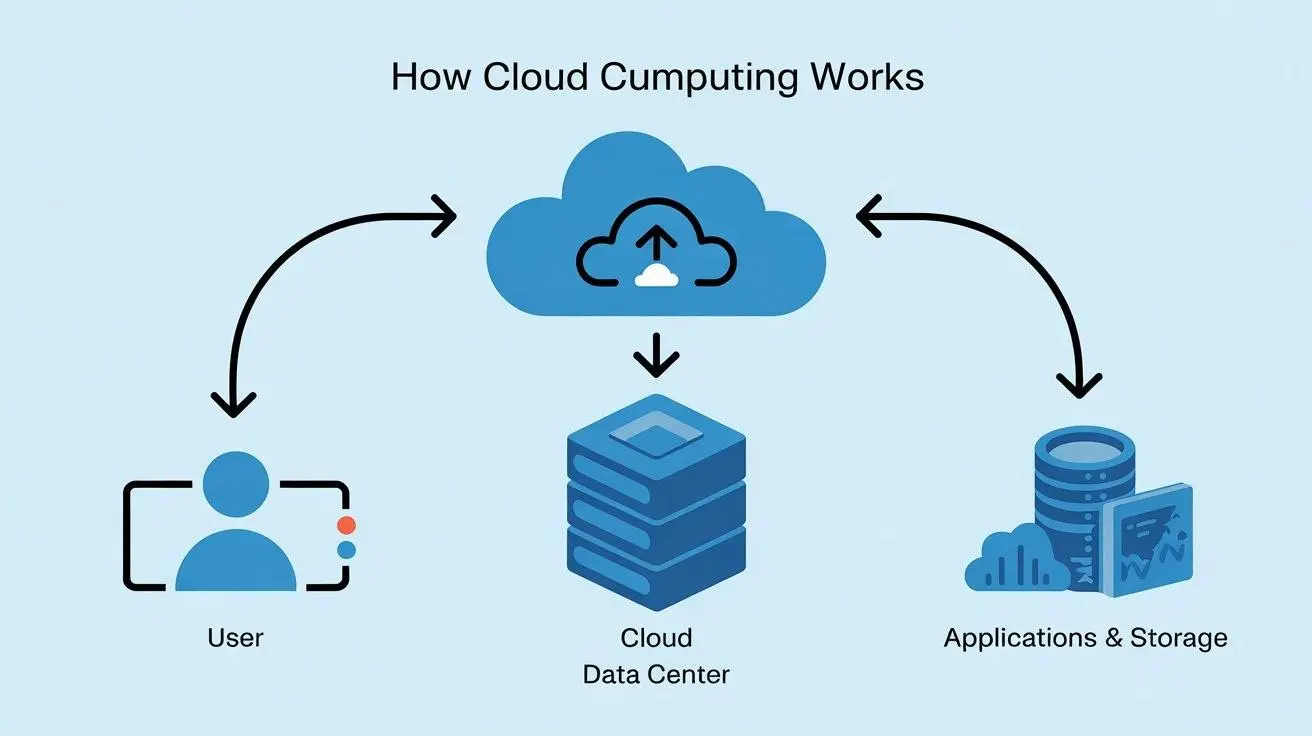
Cloud computing connects applications with on-demand computing, storage, and networking resources.
Cloud Computing Basics
Cloud computing provides access to technology resources without requiring users to own and maintain all the underlying physical infrastructure. Depending on the service, the provider may manage hardware, networking, operating systems, runtime environments, or application components.
Key Characteristics of Cloud Computing
- On-demand access: Resources can be provisioned when needed.
- Scalability: Capacity can be adjusted to meet workload requirements.
- Resource pooling: Providers serve multiple customers through shared infrastructure with logical isolation.
- Measured usage: Many services track resource consumption for billing and monitoring.
- Network access: Resources are managed through supported network connections and interfaces.
Example: Hosting a Website
Imagine a business launching a website. It could use a cloud virtual machine to run its application, object storage for uploaded files, a managed database for records, and monitoring tools to review performance. Each component has a specific role and may be scaled or secured independently.
Cloud Service Models
Cloud services are commonly grouped into Infrastructure as a Service, Platform as a Service, and Software as a Service. These models differ in how much of the technology stack the provider manages.
1. Infrastructure as a Service (IaaS)
IaaS provides resources such as virtual machines, storage, and networking. Users generally manage the operating system and the applications installed on the infrastructure, while the provider manages the underlying physical facilities.
2. Platform as a Service (PaaS)
PaaS provides a managed environment for building and running applications. The provider manages more of the underlying infrastructure and runtime, allowing developers to focus on application code and configuration.
3. Software as a Service (SaaS)
SaaS delivers software through a web browser or application. The provider manages the application and its supporting infrastructure, while users configure the features and access permissions available to them.
Service Model Example
- IaaS: configuring a virtual server for a web application.
- PaaS: deploying application code to a managed application platform.
- SaaS: using an online email or collaboration application.
Cloud Deployment Models
Cloud deployment models describe how infrastructure is made available and managed. The suitable model depends on security requirements, workload needs, compliance obligations, existing systems, and cost.
Public Cloud
Public cloud services are provided by a cloud provider to customers over a network. Customers use logically separated resources and configure access controls according to their requirements.
Private Cloud
A private cloud environment is dedicated to a single organisation. It may be hosted in the organisation's own facilities or by a service provider.
Hybrid Cloud
Hybrid cloud combines private infrastructure with public cloud services. Organisations may use this approach to connect existing systems with selected cloud workloads, provided the integration is planned and managed carefully.
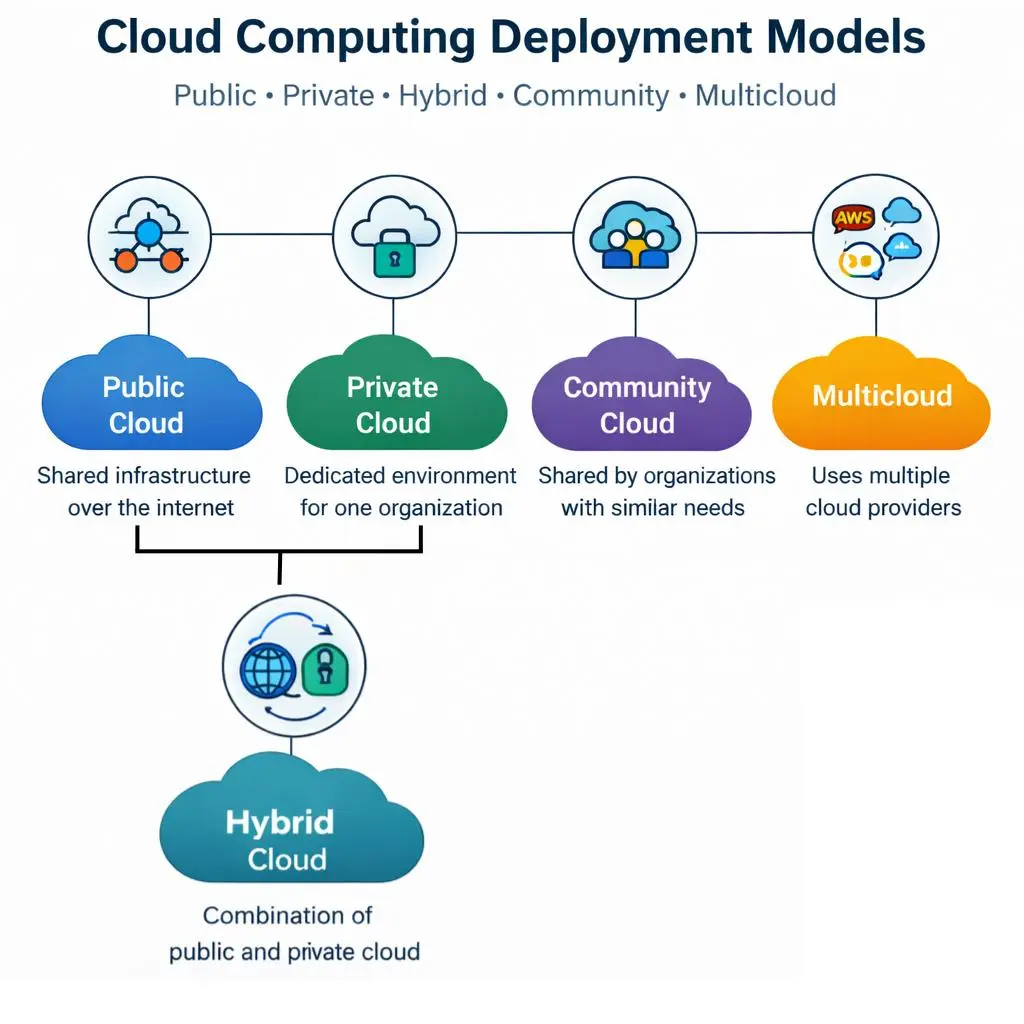
Public, private, and hybrid cloud models support different infrastructure and operational requirements.
AWS Tutorials for Beginners
Amazon Web Services (AWS) is a cloud platform offering services for computing, storage, networking, databases, security, analytics, and application development. AWS Tutorials for Beginners should start with the core cloud concepts before progressing to individual services and deployments.
Getting Started with AWS
- Learn the purpose of cloud regions and availability zones.
- Understand identity, access permissions, and shared responsibility.
- Explore compute, storage, networking, and database services.
- Learn how to monitor resource usage and review costs.
- Practise in an authorised account using a controlled environment.
AWS Shared Responsibility Model
Cloud security is shared between the provider and the customer. The provider is responsible for security of the underlying cloud infrastructure, while customers remain responsible for tasks such as identity permissions, data protection, and service configuration. The exact responsibilities vary by service.
Before creating cloud resources, review pricing, set up billing alerts where available, and remove resources when they are no longer required. Some services can generate charges even when they are used for learning.
Essential AWS Services
Learning a small set of core services can help beginners understand how cloud applications are assembled. Start by understanding the purpose of each service rather than trying to memorise every available feature.
Amazon EC2
Amazon Elastic Compute Cloud (EC2) provides virtual server capacity. Users select suitable instance types, configure access, install software when required, and manage the operating system for their instances.
Amazon S3
Amazon Simple Storage Service (S3) provides object storage for files, backups, static assets, and other supported data. Permissions and public-access settings should be reviewed carefully to avoid exposing private data.
Amazon RDS
Amazon Relational Database Service (RDS) simplifies the setup and management of supported relational databases. It provides managed database capabilities, while users remain responsible for appropriate access, data, and configuration choices.
Amazon VPC
Amazon Virtual Private Cloud (VPC) provides a logically isolated network environment. Subnets, routing, and security controls help determine how cloud resources communicate with one another and with external networks.
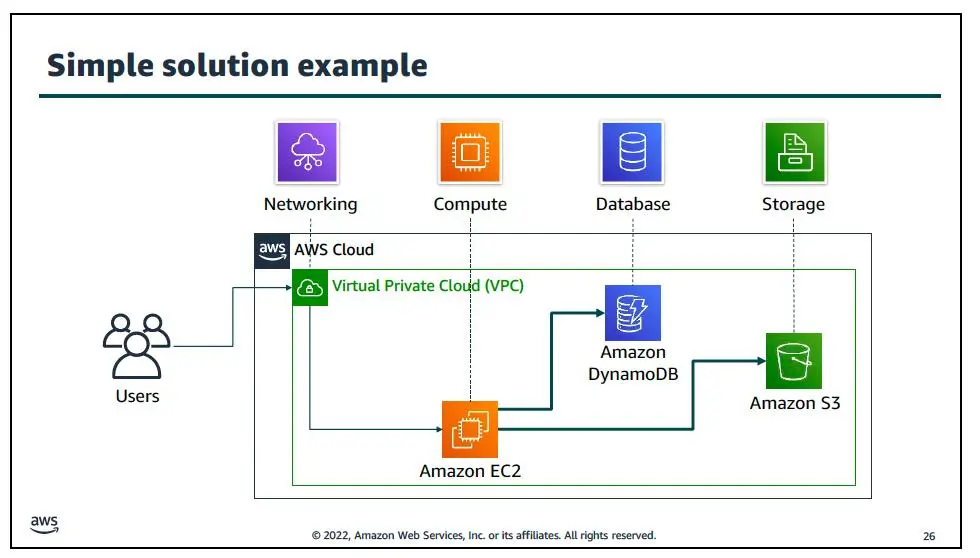
Core cloud services provide compute capacity, object storage, managed databases, and networking.
Cloud Security Basics
Cloud security involves protecting accounts, workloads, applications, networks, and data. Good security practices should be applied from the beginning, including when using a learning environment.
Important Security Practices
- Use strong authentication and multifactor authentication where available.
- Grant users and services only the permissions they require.
- Do not publish access keys, passwords, or tokens in source code.
- Keep systems and application dependencies updated.
- Encrypt sensitive data where appropriate.
- Review logs, access settings, and unexpected resource usage.
- Remove unused resources and credentials safely.
Example: Protecting Credentials
# Avoid hardcoding credentials in source code.
# Use an approved secret manager or environment configuration.

# Example environment variable names:
AWS_ACCESS_KEY_ID=your_configured_access_key
AWS_SECRET_ACCESS_KEY=your_configured_secret_key

# Never commit real credentials to a public repository.
The values above are placeholders, not working credentials. For real workloads, follow the cloud provider's recommended authentication method and never share secrets in public repositories, screenshots, or tutorials.
DevOps Tutorials for Beginners
DevOps is a set of practices and cultural approaches that improve collaboration between software development and IT operations. It often involves automation, version control, testing, continuous delivery, infrastructure management, monitoring, and feedback.
Why Is DevOps Important?
- Helps teams manage source code and configuration changes consistently.
- Supports automated testing and repeatable build processes.
- Can reduce manual work in deployment workflows.
- Encourages monitoring and feedback after releases.
- Helps teams identify and address issues throughout delivery.
Common DevOps Tools
- Git: Tracks source code changes.
- Docker: Packages applications and dependencies into containers.
- CI/CD platforms: Automate build, test, and delivery workflows.
- Infrastructure as Code tools: Define and manage infrastructure through files.
- Monitoring tools: Collect and present operational metrics and logs.
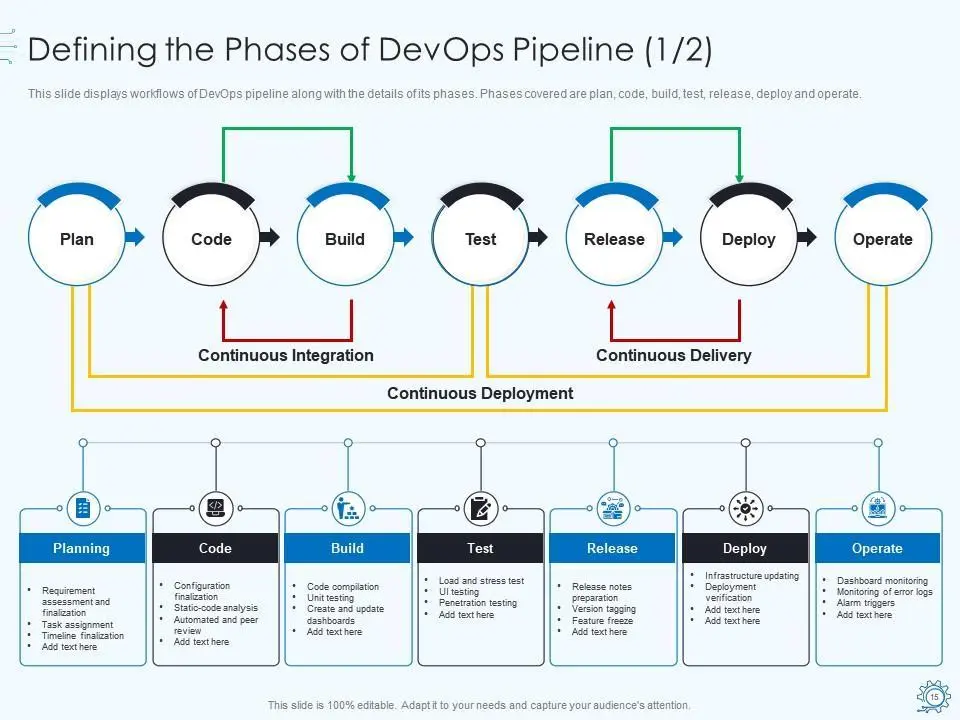
A DevOps workflow connects development, automated delivery, operations, and continuous feedback.
Git and Version Control Basics
Git is a version control system that records changes to files over time. It helps developers work on code, review differences, create branches, and collaborate with others.
Basic Git Commands
# Initialise a repository
git init

# Check changed files
git status

# Stage a file
git add README.md

# Save a change
git commit -m "Add project documentation"

# View recent commits
git log --oneline
Run these commands inside a project directory where you have permission to work. A commit records a local snapshot; sharing changes with a remote repository requires additional configuration and commands.
Docker Tutorials with Examples
Docker is a platform used to build, distribute, and run applications in containers. A container packages an application with the components it needs, helping provide a more consistent runtime environment across development and deployment.
Docker Images and Containers
- Image: A packaged template used to create containers.
- Container: A running or stopped instance created from an image.
- Dockerfile: A text file containing instructions for building an image.
- Container registry: A location for storing and distributing images.
Basic Docker Commands
# Check the installed Docker version
docker --version

# Download a sample image
docker pull nginx

# Run a container and map a local port
docker run --name demo-nginx -d -p 8080:80 nginx

# View running containers
docker ps

# Stop the sample container
docker stop demo-nginx
If Docker is installed and running, the example starts an Nginx container and maps port 8080 on your computer to port 80 in the container. Open http://localhost:8080 to test it locally. Stop and remove test containers when finished.
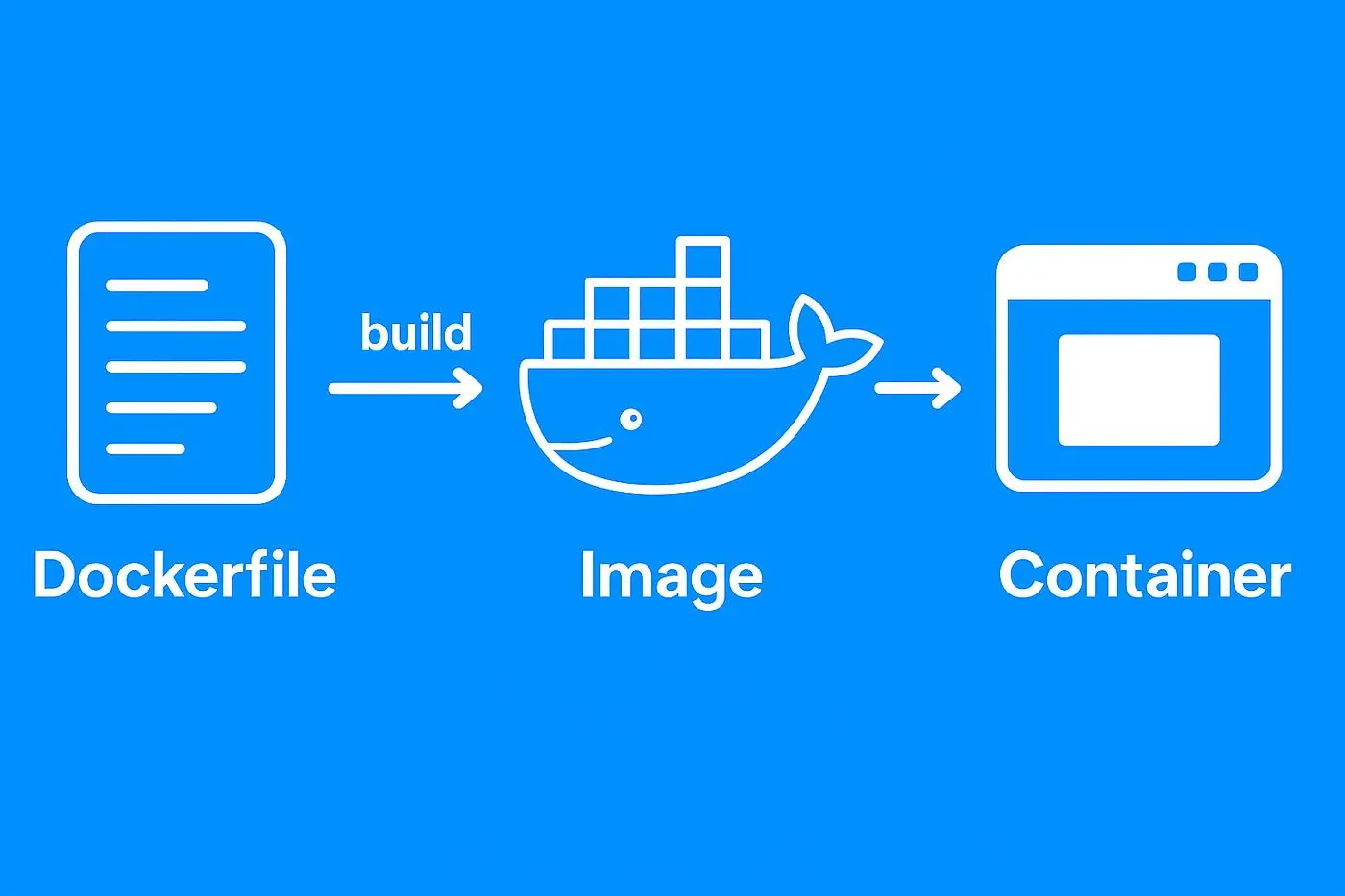
A Dockerfile defines build instructions, an image packages the application, and a container runs it.
Understanding a Dockerfile
A Dockerfile contains instructions for building a container image. It commonly specifies a base image, a working directory, files to copy, dependencies to install, and the command used to start the application.
Simple Dockerfile Example
# Start from an Nginx base image
FROM nginx:alpine

# Copy a local HTML file into the default web directory
COPY index.html /usr/share/nginx/html/index.html
Build and Run the Image
# Build the image from the current directory
docker build -t sample-web-app .

# Run the container
docker run --name sample-web -d -p 8080:80 sample-web-app
Save the Dockerfile and an index.html file in the same directory before building. The commands are introductory examples; real projects may need additional configuration for security, caching, networking, and persistent data.
CI/CD Pipeline Tutorials
Continuous Integration (CI) encourages developers to integrate changes frequently and validate them through automated checks. Continuous Delivery or Continuous Deployment (CD) extends the workflow to preparing or releasing validated software.
Typical CI/CD Pipeline Stages
- Source: A code change is committed to version control.
- Build: The application or its deployable package is created.
- Test: Automated checks verify expected behaviour.
- Package: An artefact or container image is prepared.
- Deploy: The approved version is released to a target environment.
- Monitor: Logs and metrics are reviewed after deployment.
The exact pipeline varies by programming language, repository, platform, and release process. A delivery workflow may require manual approval before production deployment.
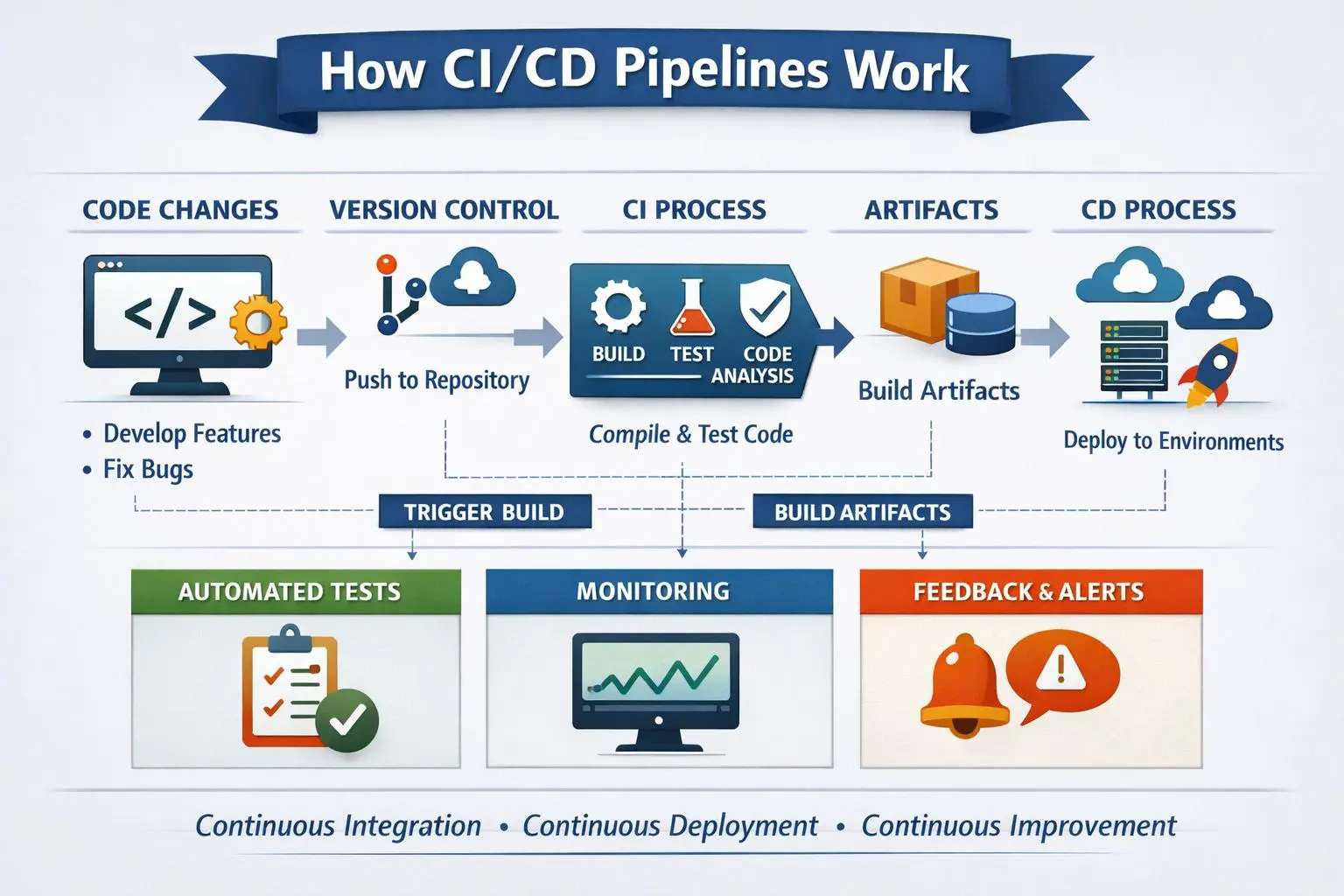
A CI/CD pipeline automates repeatable checks and delivery steps from code changes to deployment.
Simple CI/CD Pipeline Example
The following simplified workflow uses GitHub Actions to run a basic check whenever code is pushed or a pull request is opened. It demonstrates the structure of a pipeline; a real application should include suitable dependency installation, tests, and deployment steps.
name: Basic CI

on:
  push:
  pull_request:

jobs:
  validate:
    runs-on: ubuntu-latest

    steps:
      - name: Check out source code
        uses: actions/checkout@v4

      - name: Display validation message
        run: echo "Source code is checked out successfully"
Save the workflow in the indicated path within a GitHub repository. The example confirms that the workflow can start and check out the repository; it does not replace application-specific tests or prove that the application is production-ready.
CI/CD Best Practices
- Keep workflows readable and maintainable.
- Run automated tests appropriate to the application.
- Store sensitive values in approved secrets management features.
- Use restricted permissions for workflow tokens.
- Require appropriate approvals for sensitive deployments.
- Review pipeline logs when a step fails.
Monitoring and Logging Basics
Monitoring helps teams understand application and infrastructure health by collecting metrics such as response time, resource utilisation, error rates, and availability. Logging records events that can help explain what happened during application execution.
What Should Beginners Monitor?
- CPU and memory utilisation.
- Application response times and error rates.
- Service availability and health checks.
- Deployment outcomes and failed pipeline stages.
- Unexpected traffic, access patterns, or resource costs.
Monitoring should be connected to meaningful objectives. Alerts need clear thresholds, suitable recipients, and a response process so that teams can investigate issues instead of receiving unnecessary notifications.
Cloud and DevOps Projects for Beginners
Small projects help learners apply cloud concepts, command-line tools, containers, and automation. Start in a local environment or an authorised cloud account, and check costs before provisioning paid services.
1. Host a Static Website
Create a basic HTML website and learn how static hosting works. Document the hosting configuration, access settings, and steps required to update the page.
2. Run a Docker Container
Run a sample web server in a container, map a local port, review the logs, and document how to stop the container.
3. Build a Simple CI Workflow
Create a repository and configure a workflow that runs whenever code is pushed. Add suitable checks as your understanding improves.
4. Prepare a Cloud Architecture Diagram
Draw an example architecture showing a web application, compute service, database, storage, and network boundaries. Add short explanations of the purpose of each component.
5. Create a Deployment Checklist
Document the build, testing, configuration, security review, deployment, rollback, and monitoring steps for a sample application.
Cloud Computing and DevOps Learning Roadmap
Follow this learning roadmap to build a foundation before moving to more advanced cloud infrastructure and deployment tasks.
- Step 1: Learn networking, Linux basics, and command-line fundamentals.
- Step 2: Study cloud concepts, service models, and deployment models.
- Step 3: Explore AWS compute, storage, networking, and identity services.
- Step 4: Learn Git and practise version control.
- Step 5: Study DevOps principles and automation concepts.
- Step 6: Practise Docker images, containers, and Dockerfiles.
- Step 7: Build a basic CI workflow and learn pipeline stages.
- Step 8: Explore monitoring, logging, security, and cost management.
- Step 9: Complete small projects and document what you learned.
Cloud platforms and DevOps tools change regularly. Consult current official documentation for service features, pricing, security requirements, and version-specific commands.
Frequently Asked Questions About Cloud Computing Tutorials
1. What are Cloud Computing Tutorials?
Cloud Computing Tutorials explain how cloud services provide computing power, storage, databases, networking, and other resources over the internet. They introduce cloud concepts, deployment models, security, and practical cloud operations.
2. Are Cloud Computing Tutorials for Beginners suitable for students?
Yes. Beginners can start with cloud fundamentals, service models, deployment models, and basic networking before practising with cloud platforms and guided exercises.
3. What can I learn from AWS Tutorials for Beginners?
AWS Tutorials for Beginners introduce Amazon Web Services concepts such as compute, storage, networking, identity and access management, monitoring, and basic cloud deployment.
4. What do DevOps Tutorials for Beginners cover?
DevOps Tutorials for Beginners cover collaboration between development and operations, version control, automation, testing, continuous integration, continuous delivery, monitoring, and deployment practices.
5. What are Docker Tutorials with Examples useful for?
Docker Tutorials with Examples explain container images, containers, Dockerfiles, image building, and running applications in consistent environments. They help learners understand the basics of containerisation.
6. What do CI/CD Pipeline Tutorials teach?
CI/CD Pipeline Tutorials explain how code changes can be built, tested, and prepared for deployment through automated workflows. They introduce pipeline stages, quality checks, deployment approvals, and monitoring.
Start Learning Cloud Computing and DevOps
Explore Cloud Computing Tutorials for Beginners, learn AWS fundamentals, practise DevOps workflows, understand Docker containers, and build a foundation in CI/CD pipelines through practical examples and beginner projects.