
Cantonment Branch
77, C4, St. Pauls Complex,
Pudukottai Main Road, Bharathiyar Salai,
Cantonment, Tiruchirappalli,
Tamil Nadu 620001

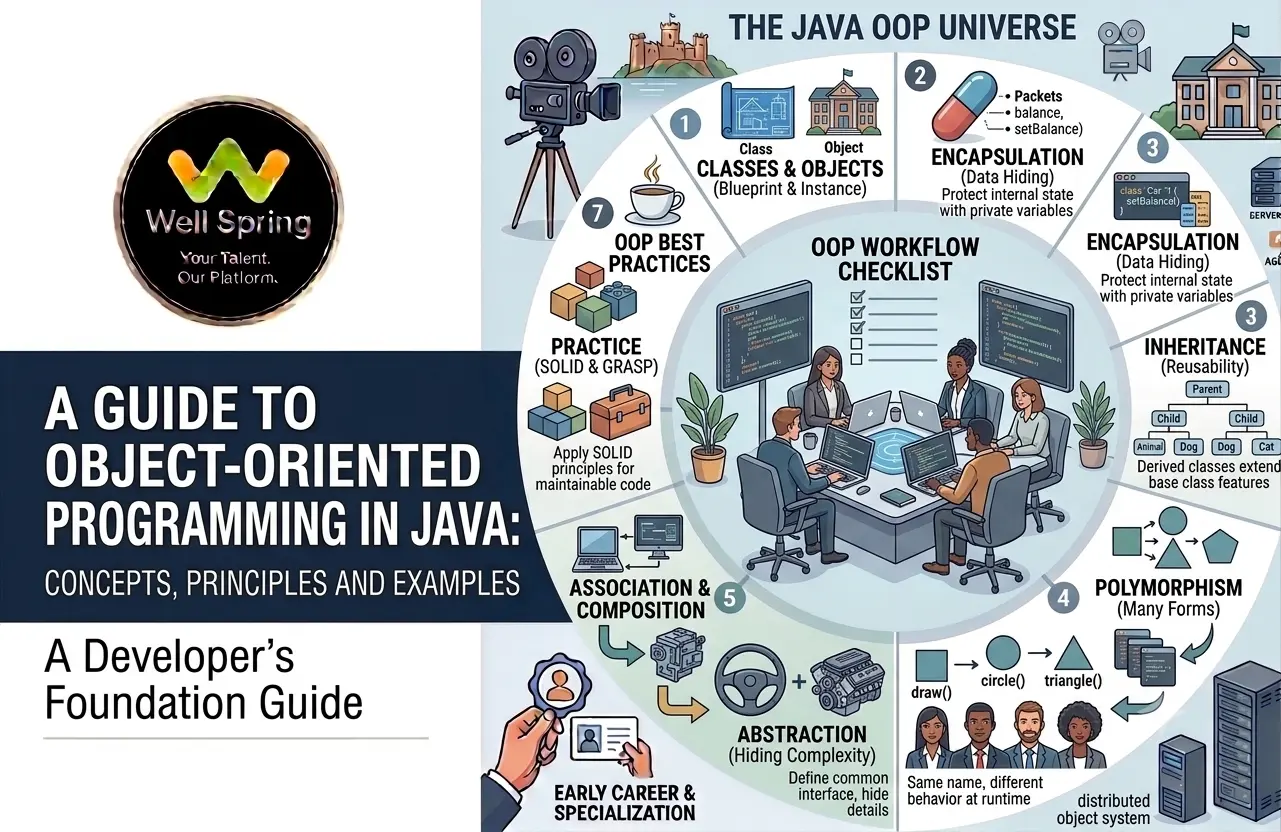
When Java programs become larger, writing everything as a collection of unrelated functions can make the code difficult to organise, maintain, and extend. Java addresses this challenge primarily through object oriented programming in Java, a programming approach that organises software around objects that combine data and behaviour.
Object-oriented programming, commonly called OOP, is one of the fundamental concepts Java developers need to understand. It provides a way to model real-world entities, organise application logic, reuse code, and create relationships between different components.
The major OOP concepts in Java include classes, objects, inheritance, encapsulation, polymorphism, and abstraction. These ideas work together rather than existing as completely separate features.
This guide explains the Java OOP principles from the ground up, with simple examples to help beginners understand how each concept works and when it is useful.
Object-oriented programming in Java is a programming approach where software is structured around objects that contain state and behaviour. Its four commonly taught principles are encapsulation, inheritance, polymorphism, and abstraction, supported by Java features such as classes, objects, interfaces, and methods.
Object oriented programming in Java is a programming paradigm in which software is organised around objects and the classes that define them.
An object can contain:
For example, consider a Student object.
A student may have:
Name
Age
Course
These represent state.
The student might also have behaviours such as:
study()
attendClass()
submitAssignment()
These represent behaviour.
In Java, a class provides the blueprint for creating such objects.
class Student {
String name;
int age;
void study() {
System.out.println(name + " is studying.");
}
}
An object can then be created from the class:
Student student1 = new Student();
student1.name = "Arun";
student1.age = 20;
student1.study();
Here:
OOP helps developers structure larger programs into understandable components.
1. Code organisation
Related data and behaviour can be grouped within classes.
2. Reusability
Classes and inheritance can reduce unnecessary duplication when used appropriately.
3. Maintainability
Well-designed objects can isolate responsibilities, making changes easier to manage.
4. Flexibility
Polymorphism and abstraction allow code to work with general types while supporting different implementations.
5. Data protection
Encapsulation can control how an object's internal state is accessed or modified.
6. Real-world modelling
Objects can represent concepts such as:
This makes OOP particularly useful for modelling complex application domains.
Understanding classes and objects in Java is the foundation for learning OOP.
A class is a type that defines the structure and behaviour that its objects can have.
Example:
class Car {
String brand;
int speed;
void drive() {
System.out.println("The car is moving.");
}
}
The class defines:
It does not represent one particular car by itself.
An object is an instance of a class.
Car car1 = new Car();
Now car1 refers to a Car object.
You can assign values:
car1.brand = "Toyota";
car1.speed = 80;
and call its method:
car1.drive();
|
Class |
Object |
|
Blueprint/type definition |
Instance of a class |
|
Defines possible state and behaviour |
Contains actual state |
|
Does not represent one specific instance |
Represents a specific instance |
|
Example: Car |
Example: car1 |
One class can create many objects:
Car car1 = new Car();
Car car2 = new Car();
Car car3 = new Car();
Each object can maintain its own state.
The four commonly taught Java OOP principles are:
They can be remembered as:
However, memorising the names is less important than understanding the problem each principle solves.
|
Principle |
Main Idea |
|
Encapsulation |
Control access to internal state |
|
Inheritance |
Build a class relationship for reuse/specialisation |
|
Polymorphism |
Use a common type with different implementations |
|
Abstraction |
Expose essential behaviour while hiding implementation details |
Encapsulation in Java means organising data and the operations that work with that data within a class while controlling access to the internal state.
A common implementation uses:
Example:
class BankAccount {
private double balance;
public double getBalance() {
return balance;
}
public void deposit(double amount) {
if (amount > 0) {
balance += amount;
}
}
}
The balance field is private.
External code cannot directly do:
account.balance = -5000;
Instead, it interacts through the class's methods.
BankAccount account = new BankAccount();
account.deposit(1000);
System.out.println(account.getBalance());
Why is encapsulation useful?
It allows the class to protect its internal state and enforce rules.
For example:
public void withdraw(double amount) {
if (amount <= 0) {
return;
}
if (amount > balance) {
return;
}
balance -= amount;
}
The class controls how the balance changes.
Encapsulation is not simply getters and setters
A common beginner misconception is:
Encapsulation = private variables + getters + setters.
Getters and setters can support encapsulation, but simply generating public accessors for every field does not automatically produce good encapsulation.
Good encapsulation means designing an interface that protects invariants and controls how an object's state changes.
Inheritance in Java allows one class to derive from another class.
The existing class is commonly called the:
Superclass / Parent class
The derived class is commonly called the:
Subclass / Child class
Example:
class Animal {
void eat() {
System.out.println("Animal is eating.");
}
}
class Dog extends Animal {
void bark() {
System.out.println("Dog is barking.");
}
}
Now:
Dog dog = new Dog();
dog.eat();
dog.bark();
The Dog class inherits the accessible members of Animal according to Java's inheritance rules.
Why use inheritance?
Inheritance can be useful when there is a genuine is-a relationship.
For example:
Animal
|
+-- Dog
|
+-- Cat
A dog is an animal.
A cat is an animal.
This relationship can allow shared behaviour to be represented at the appropriate level.
Method overriding
A subclass can provide its own implementation of an inherited method.
class Animal {
void makeSound() {
System.out.println("Some animal sound");
}
}
class Dog extends Animal {
@Override
void makeSound() {
System.out.println("Bark");
}
}
The @Override annotation tells the compiler that the method is intended to override a superclass method.
Java does not support multiple class inheritance
A Java class cannot directly extend multiple classes.
This is invalid:
class Dog extends Animal, Pet {
}
Java instead supports multiple inheritance of type through interfaces.
interface Swimmable {
void swim();
}
interface Trainable {
void train();
}
class Dog implements Swimmable, Trainable {
public void swim() {
System.out.println("Dog swims.");
}
public void train() {
System.out.println("Dog is training.");
}
}
Polymorphism in Java means that a common type can refer to objects of different concrete types, allowing the appropriate implementation to be selected.
The word literally means many forms.
There are two commonly discussed forms in Java:
Compile-time polymorphism
Method overloading is commonly used as an example.
class Calculator {
int add(int a, int b) {
return a + b;
}
double add(double a, double b) {
return a + b;
}
}
The method name is the same, but the parameter types differ.
Java determines which overloaded method to call based on the method signature available at compile time.
Runtime polymorphism
Runtime polymorphism commonly occurs through method overriding.
class Animal {
void makeSound() {
System.out.println("Animal sound");
}
}
class Dog extends Animal {
@Override
void makeSound() {
System.out.println("Bark");
}
}
class Cat extends Animal {
@Override
void makeSound() {
System.out.println("Meow");
}
}
Now:
Animal animal1 = new Dog();
Animal animal2 = new Cat();
animal1.makeSound();
animal2.makeSound();
Output:
Bark
Meow
The reference type is Animal, but the actual object determines which overridden method implementation runs.
This is one of the most useful aspects of polymorphism.
Abstraction in Java means exposing the essential operations of a component while hiding unnecessary implementation details.
Java primarily supports abstraction through:
The goal is not simply to “hide code.” It is to define a useful contract or common abstraction so other parts of the program do not need to depend on implementation details.
Abstract classes
An abstract class can contain abstract methods as well as implemented methods.
abstract class Vehicle {
abstract void start();
void stop() {
System.out.println("Vehicle stopped.");
}
}
A subclass provides the implementation:
class Car extends Vehicle {
@Override
void start() {
System.out.println("Car started.");
}
}
You cannot directly create an instance of an abstract class:
Vehicle v = new Vehicle(); // Invalid
But you can create:
Vehicle car = new Car();
Interfaces
An interface defines a contract that implementing classes agree to follow.
interface Payment {
void pay(double amount);
}
Different classes can implement that contract:
class CreditCardPayment implements Payment {
@Override
public void pay(double amount) {
System.out.println("Paid using credit card.");
}
}
class UpiPayment implements Payment {
@Override
public void pay(double amount) {
System.out.println("Paid using UPI.");
}
}
Now application code can work with the Payment abstraction:
Payment payment = new UpiPayment();
payment.pay(500);
The calling code does not need to know all the implementation details of UpiPayment.
The four principles are often easier to understand when viewed as a single system.
Consider an online shopping application.
class Product {
private String name;
private double price;
}
This defines the product type.
The product's fields are private and controlled through methods.
Different product categories could potentially share common behaviour through a suitable class hierarchy.
Product
|
+-- ElectronicProduct
|
+-- ClothingProduct
The application can work with a common Product or interface type while allowing specialised implementations.
An interface could define a common operation:
interface Discountable {
double calculateDiscount();
}
Different product types can implement their own discount logic.
Together, these principles allow developers to build software from components with clear responsibilities.
Interfaces play an important role in Java OOP design.
An interface can define what an implementation should provide without requiring every implementation to use the same internal approach.
Example:
interface NotificationService {
void send(String message);
}
Different implementations can then provide different notification mechanisms:
class EmailNotification implements NotificationService {
public void send(String message) {
System.out.println("Email: " + message);
}
}
class SmsNotification implements NotificationService {
public void send(String message) {
System.out.println("SMS: " + message);
}
}
Application code can depend on:
NotificationService service;
rather than being tightly coupled to one concrete implementation.
This can improve flexibility and make systems easier to extend.
Inheritance is not always the best way to reuse functionality.
Consider:
Car has an Engine
This is a has-a relationship, not an is-a relationship.
Composition can represent this:
class Engine {
void start() {
System.out.println("Engine started.");
}
}
class Car {
private Engine engine;
Car() {
engine = new Engine();
}
void startCar() {
engine.start();
System.out.println("Car started.");
}
}
Here, Car contains an Engine.
Inheritance
Use when the relationship genuinely represents:
is-a
Example:
Dog is an Animal
Composition
Use when the relationship represents:
has-a
Example:
Car has an Engine
In many designs, composition can provide more flexibility than creating deep inheritance hierarchies.
Reusability
Common functionality can be reused through well-designed classes, composition, inheritance, and interfaces.
Maintainability
Separating responsibilities into classes can make systems easier to modify.
Modularity
Different parts of an application can be represented by different components.
Flexibility
Interfaces and polymorphism can allow implementations to change without requiring every caller to change.
Data control
Encapsulation can protect object state and enforce business rules.
Scalability of design
OOP can provide useful structures for organising large applications when classes and relationships are designed with clear responsibilities.
Treating inheritance as the default reuse mechanism
Not every relationship should use extends.
Ask:
Is this genuinely an “is-a” relationship?
If not, composition may be more appropriate.
Making every field public
This exposes internal state unnecessarily.
Instead of:
public double balance;
consider:
private double balance;
and provide controlled operations.
Creating huge classes
A class that handles payments, authentication, reporting, email, database access, and UI logic becomes difficult to maintain.
Give classes focused responsibilities.
Overusing getters and setters
Automatically generating getters and setters for every field does not necessarily create good object-oriented design.
Ask whether the outside world really needs direct access to that state.
Confusing overloading with overriding
Overloading: Same method name with different parameter lists.
Overriding: A subclass provides a new implementation of an inherited method with a compatible signature.
Memorising the four principles without understanding them
Knowing the definitions is not enough.
You should be able to answer:
What problem does this principle solve?
That is where practical understanding begins.
Consider a simple employee management application.
abstract class Employee {
private String name;
public Employee(String name) {
this.name = name;
}
public String getName() {
return name;
}
abstract double calculateSalary();
}
Here, we have:
Now create specialised employee types:
class FullTimeEmployee extends Employee {
private double monthlySalary;
public FullTimeEmployee(String name, double monthlySalary) {
super(name);
this.monthlySalary = monthlySalary;
}
@Override
double calculateSalary() {
return monthlySalary;
}
}
And:
class Freelancer extends Employee {
private double hourlyRate;
private int hoursWorked;
public Freelancer(
String name,
double hourlyRate,
int hoursWorked
) {
super(name);
this.hourlyRate = hourlyRate;
this.hoursWorked = hoursWorked;
}
@Override
double calculateSalary() {
return hourlyRate * hoursWorked;
}
}
Now polymorphism can be used:
Employee employee1 =
new FullTimeEmployee("Arun", 50000);
Employee employee2 =
new Freelancer("Meena", 500, 80);
System.out.println(
employee1.getName() + ": " +
employee1.calculateSalary()
);
System.out.println(
employee2.getName() + ": " +
employee2.calculateSalary()
);
Both objects are treated as Employee, but each provides its own implementation of calculateSalary().
This example combines several OOP concepts in Java in one design:
|
OOP Concept |
Example |
|
Class |
Employee, FullTimeEmployee, Freelancer |
|
Object |
employee1, employee2 |
|
Encapsulation |
Private fields |
|
Inheritance |
Employee subclasses |
|
Abstraction |
Abstract calculateSalary() |
|
Polymorphism |
Different salary implementations |
If you are learning Java for the first time, do not try to memorise all OOP terminology at once.
Follow this progression:
Step 1: Learn classes
Understand how a class defines state and behaviour.
Step 2: Create objects
Practise creating multiple objects from one class.
Step 3: Learn encapsulation
Use access modifiers and methods to control state.
Step 4: Learn inheritance
Understand superclass-subclass relationships.
Step 5: Learn overriding
Practise changing inherited behaviour.
Step 6: Learn polymorphism
Use superclass or interface references to work with different implementations.
Step 7: Learn abstraction
Build interfaces and abstract classes around common contracts.
Step 8: Practise composition
Learn when an object should contain another object rather than inherit from it.
Step 9: Build a project
Create something such as:
Projects make the concepts easier to connect.
Learning object oriented programming in Java is a major step toward becoming a capable Java developer. Classes and objects provide the foundation, while encapsulation, inheritance, polymorphism, and abstraction help developers organise increasingly complex software.
The real value of OOP comes from knowing when and why to use each concept. Encapsulation can protect state, inheritance can model genuine hierarchies, polymorphism can make designs flexible, and abstraction can separate what a component does from how it does it.
Rather than learning these concepts only as definitions, practise them through small Java programs and progressively larger projects. Once you can recognise these principles in real applications, Java OOP becomes much more than an interview topic—it becomes a practical way to design maintainable software.

31 Oct 2026

31 Oct 2026
30 Oct 2026
30 Oct 2026

29 Oct 2026
Object oriented programming in Java is a programming approach that structures applications around objects containing state and behaviour. Java uses classes, objects, inheritance, interfaces, encapsulation, abstraction, and polymorphism to support object-oriented design.
The four commonly taught OOP principles are encapsulation, inheritance, polymorphism, and abstraction. Classes and objects provide the basic structure through which these concepts are implemented.
Encapsulation in Java involves controlling access to an object's internal state and combining that state with the operations that manage it. Private fields and controlled methods are commonly used to achieve this.
Inheritance allows a subclass to derive from a superclass using extends. It is useful when there is a genuine “is-a” relationship and when specialised classes need to share appropriate behaviour from a common base.
Polymorphism allows code to work with a common type while different objects provide different implementations. Runtime polymorphism commonly occurs when an overridden method is invoked through a superclass or interface reference.
Abstraction focuses on exposing essential behaviour while hiding implementation details. Java provides abstract classes and interfaces as major mechanisms for creating abstractions.
A class defines a type and its possible state and behaviour, while an object is an instance of that class. For example, Car can be a class and car1 can refer to a specific Car object.
Overloading means defining methods with the same name but different parameter lists. Overriding occurs when a subclass provides a new implementation of an inherited method.
Java is strongly object-oriented but is not purely object-oriented because it includes primitive types such as int, char, and boolean. Java also provides wrapper classes and autoboxing to work with primitives in object-oriented contexts.
Use inheritance when the relationship genuinely represents “is-a” and the subclass is a meaningful specialisation of the superclass. Use composition when one object contains or uses another object, representing a “has-a” relationship.
We provide IT training, internships, and online learning for students in Trichy and across India.
Can't attend classes in person? Explore online IT training opportunities with Well Spring Talent Solutions, designed to help learners develop practical technology skills from different locations across India.
Get internship updates, IT training news, placement opportunities, and career tips directly to your inbox.
Join our WhatsApp community for internship updates, IT courses, placement support, and latest job opportunities.
Join NowVisit our branches in Tiruchirappalli for IT training and career guidance.
77, C4, St. Pauls Complex,
Pudukottai Main Road, Bharathiyar Salai,
Cantonment, Tiruchirappalli,
Tamil Nadu 620001
2nd Floor, C56, 4th Cross Rd W, opp. Poorvika Mobiles, Thillai Nagar, Tiruchirappalli,
Tamil Nadu 620018
YVD Complex, chatram bus stand, No. 15, Tiruchirappalli,
Tamil Nadu 620002, India
16, 1st Cross Road, Anna Nagar, Tiruchirappalli,
Tamil Nadu 620007