Blog Details
Home Blog Details

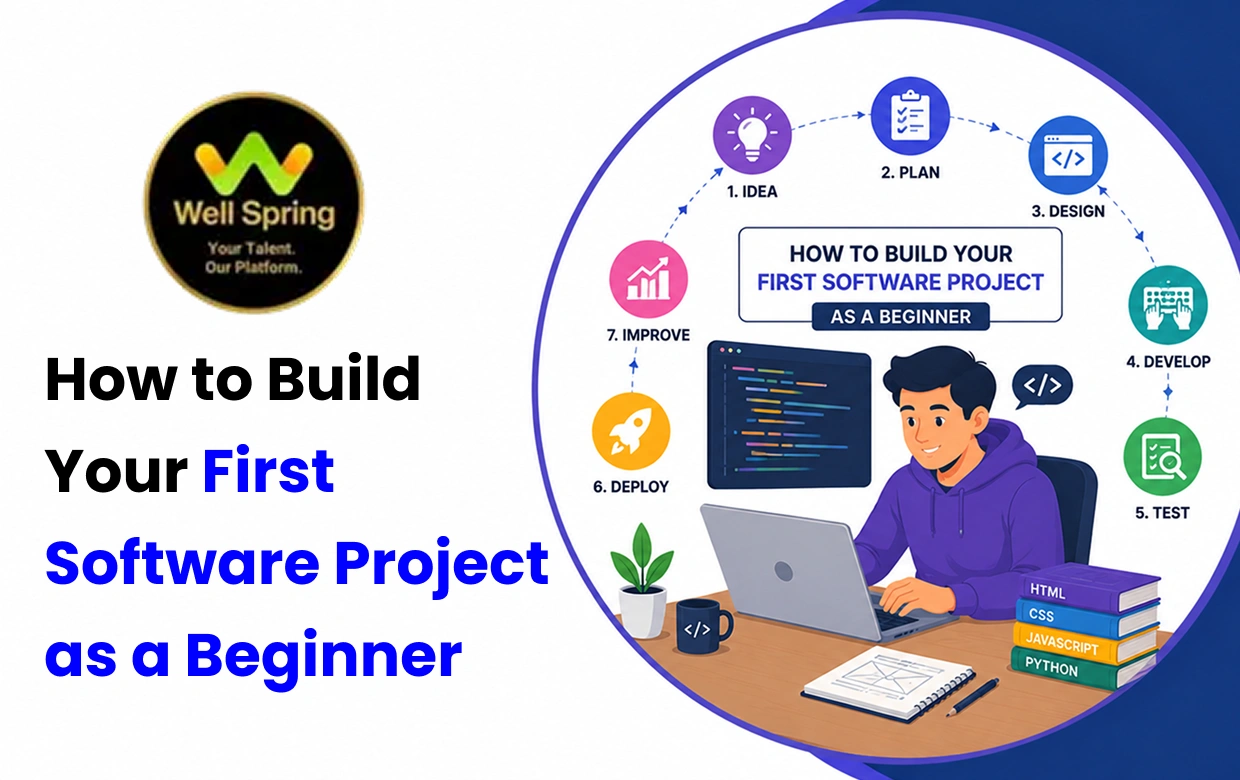
Building your first software project is one of the best ways to turn programming knowledge into practical skills. Instead of only learning concepts from courses or tutorials, you learn how to identify a problem, define requirements, plan features, write code, test an application, debug errors, and improve your solution.
If you want to learn how to build a software project, this beginner-friendly guide explains the process from choosing an idea to creating a portfolio-ready application. It covers software projects for beginners, project planning, technology selection, Git and version control, debugging, testing, deployment, documentation, and current industry expectations.
Whether you are a student, fresher, aspiring developer, or someone learning programming independently, these steps can help you build your first coding project with greater confidence.
To build your first software project, start with a simple problem and define the core features your application needs. Choose technologies that match your current skills and career goal, create a basic plan, and divide the project into smaller tasks.
Build one feature at a time, test your work regularly, use Git to track changes, and learn to debug errors instead of simply copying solutions. Once the core application works reliably, improve it, deploy it when practical, and document what you built.
Your first project does not need to be complicated. The goal is to understand the complete development process and create something you can confidently explain, demonstrate, and improve.
Learning programming teaches you how individual concepts work. Building a software project teaches you how those concepts work together to solve a real problem.
A beginner may understand variables, loops, functions, databases, or frameworks but still feel uncertain when asked to create an application independently.
That is where project-based learning becomes valuable.
A software project requires you to take an idea, understand a problem, make technical decisions, write code, identify errors, test your solution, and explain the final result.
For students and fresh graduates, this experience can also strengthen a portfolio and provide useful examples to discuss during technical interviews.
Your first project does not need to solve a huge problem. It needs to be complete enough to teach you how software moves from an idea to a working solution.
Building a software project means converting a problem, requirement, or idea into a working digital solution.
The process generally includes:
For example, imagine that students find it difficult to organize their assignments.
You could turn that problem into a student task management application.
The application might allow users to:
This becomes a useful beginner project because you have to make decisions about the application's structure, data, interface, and functionality instead of simply following a tutorial.
Instead of learning JavaScript, Python, Java, or another language only through exercises, you use those skills to solve an actual problem.
Software development requires you to break large problems into smaller, manageable ones. Projects give you repeated practice doing this.
Errors are a normal part of learning software development. Projects teach you how to investigate problems instead of becoming dependent on someone else to fix them.
A completed project gives recruiters, mentors, and employers something concrete to evaluate.
Projects give you real examples to discuss when interviewers ask about technologies, databases, coding decisions, debugging, testing, and challenges.
A project teaches you that software development involves more than writing code. Planning, testing, version control, deployment, documentation, and maintenance are also part of the process.
The first step in starting a software project is identifying a problem.
Instead of asking:
"What complicated application can I build?"
Ask:
"What simple problem can I solve with software?"
Beginner-friendly problems include:
A clear problem gives your project direction and prevents unnecessary features.
A Useful Rule
Choose a problem that is:
Your first project should be small enough to finish.
Once you identify a problem, choose an idea that is achievable with your current knowledge.
|
Beginner Project |
Skills You Can Practise |
|
To-Do List |
HTML, CSS, JavaScript, CRUD |
|
Portfolio Website |
HTML, CSS, responsive design |
|
Calculator |
Programming logic and functions |
|
Expense Tracker |
Forms, calculations, data storage |
|
Quiz Application |
JavaScript, conditions, functions |
|
Student Management System |
CRUD, databases, backend |
|
Weather Application |
APIs, JavaScript, JSON |
|
Blog Application |
Backend, database, authentication |
|
Library Management System |
CRUD and database design |
|
Simple E-Commerce Website |
Frontend, backend, database |
Choose Based on Your Career Goal
|
Career Goal |
Suitable Beginner Project |
|
Frontend Development |
Portfolio website, To-Do app, Weather app |
|
Backend Development |
Student management system, REST API |
|
Full-Stack Development |
Blog, Expense tracker, E-commerce prototype |
|
Data Analytics |
Expense analysis, Sales dashboard |
|
AI/ML |
Prediction or classification project |
|
Mobile Development |
Notes app, Habit tracker |
|
Cybersecurity |
Security awareness tool, basic log-analysis project |
You do not need to build all of these. Choose one project that aligns with the skills you want to develop.
Before coding, decide exactly what your application should do.
Start with four questions.
Project Objective
What problem does the application solve?
Target Users
Who will use it?
Core Features
What must the application do in its first version?
Future Features
What could be added later?
For example, an expense tracker could have these core features:
Advanced features such as charts, monthly reports, authentication, and exports can be added later.
This approach keeps the first version manageable.
Your technology stack should match both the project and your current skill level.
Frontend
For a basic web application, beginners can start with:
Backend
Depending on your career goals, you can explore:
Databases
Common options include:
Version Control
Git allows you to track changes, maintain project history, experiment safely, and collaborate with others.
Do Not Choose Technology Simply Because It Is Popular
A technology is useful when you understand how to apply it to your project.
For a first project, it is often better to use a familiar stack and learn one or two new concepts than to combine several unfamiliar frameworks.
One common beginner mistake is opening a code editor immediately and developing random features.
Instead, create a simple plan.
Your plan can include:
You can also create a simple user flow.
For an expense tracker:
Login → Dashboard → Add Expense → Save Expense → View Expenses → Generate Summary
Planning gives you a roadmap before development begins.
A project becomes easier when you divide it into manageable parts.
For example, a student management system could be divided into:
Phase 1: Project Setup
Phase 2: Interface
Phase 3: Backend
Phase 4: CRUD
Phase 5: Testing
Phase 6: Deployment
Breaking the application into smaller tasks makes progress easier to track and helps you identify where problems occur.
Your first project does not need a professional-grade design system.
Focus on usability.
A beginner application should be:
Before coding, create a basic wireframe.
For example:
Header → Navigation → Main Content → Form/List → Footer
Think about what users need to see and what actions they need to perform.
A simple interface that works well is better than a visually complicated application that users find difficult to understand.
Do not attempt to develop the entire application simultaneously.
Instead, complete one feature, test it, and then move to the next.
For an expense tracker:
Feature 1: Create expense form
↓
Feature 2: Validate form
↓
Feature 3: Save expense
↓
Feature 4: Display expenses
↓
Feature 5: Calculate total
↓
Feature 6: Add delete functionality
This approach makes it easier to find problems and understand how each part of the application works.
Version control is an important part of modern software development.
For your first project, learn the basics of:
A simple workflow is:
Create Project → Initialize Git → Build Feature → Test → Commit → Build Next Feature → Commit → Deploy
Do not wait until the project is finished before learning Git.
Using version control throughout development helps you understand how developers manage changes and gives you a clearer project history to showcase.
Errors are a normal part of software development.
When something goes wrong, do not immediately copy another solution without understanding the problem.
Ask:
A Simple Debugging Process
Reproduce → Identify → Isolate → Test → Fix → Retest
Read error messages carefully and consult reliable documentation when necessary.
The ability to investigate an error independently is one of the most useful skills you can develop through your first coding project.
Testing should happen throughout development rather than only at the end.
For example, if you create a registration form, test:
You should also consider several types of testing.
Functional Testing
Does the feature perform the intended action?
Validation Testing
What happens when users enter incorrect or incomplete information?
Responsive Testing
Does the interface work properly on mobile, tablet, and desktop screens?
Error Testing
What happens when an API, database, or network request fails?
Testing helps you identify problems before users encounter them.
Once the core application works, review it.
Ask:
Then make a few meaningful improvements.
Avoid adding features endlessly. A finished, tested, well-documented project is better than an ambitious project that remains incomplete.
Building the application locally is only one part of the development process.
If your project is suitable for deployment, learn how to make it available outside your development environment.
Depending on the technology, this may involve:
Even deploying a simple website can be a valuable learning experience because it introduces you to the difference between development and production environments.
Before Sharing Your Project
Make sure:
If the entire process feels overwhelming, use this simple roadmap:
Problem
↓
Requirements
↓
Project Idea
↓
Technology Stack
↓
Planning
↓
Interface Design
↓
↓
Testing
↓
Debugging
↓
Improvement
↓
Deployment
↓
Documentation
↓
Portfolio
You do not need to complete every advanced activity on your first project. The purpose of this roadmap is to help you understand how the different stages connect.
A practical example can make the process easier to understand.
Suppose you want to build an application that helps students track daily expenses.
1. Problem
Students may want a simple way to record and review their daily spending.
2. Target User
Students or beginners who want to monitor personal expenses.
3. Core Features
The first version could include:
4. Technology
A beginner-friendly version could use:
You could later introduce a backend and database.
5. Development Order
Build the application in this sequence:
Expense Form → Validation → Data Storage → Expense List → Total Calculation → Delete Function
6. Future Improvements
After completing the core version, you could add:
This example demonstrates an important principle: start with a small working version and increase complexity gradually.
Beginners often keep adding features because they are unsure when to stop.
Define your first version's completion criteria before development begins.
A project can be considered ready for your portfolio when:
You can always create a second version later.
Finished and understood is better than ambitious and incomplete.
You do not have to master everything before starting a project.
A useful learning cycle is:
Learn → Build → Make Mistakes → Debug → Understand → Improve
For example, suppose you know basic JavaScript but have never used an API.
Instead of spending weeks studying APIs before building anything, you can:
The project itself becomes part of your learning process.
This approach also helps you identify knowledge gaps. When your project requires a concept you do not understand, you have a practical reason to learn it.
Tutorials can be useful, but copying code line by line does not guarantee understanding.
Use this approach:
Learn → Rebuild → Modify → Extend
Learn
Follow a tutorial to understand the basic concept.
Rebuild
Try creating the project again without constantly looking at the original code.
Modify
Change the design, structure, or functionality.
Extend
Add at least one feature that was not part of the tutorial.
For example, if a tutorial creates a basic To-Do application, you could add:
This forces you to think independently and turns a tutorial exercise into a more meaningful learning project.
AI tools can be useful during project development when they support your learning rather than replace it.
You can use AI tools to:
However, AI-generated code should not replace your understanding.
Before using generated code, ask:
A Good Rule for Beginners
Never submit or explain code you cannot understand.
AI can accelerate learning and development, but the responsibility for understanding, testing, and validating the final application remains with you.
A completed project becomes much more valuable when you can clearly present what you built.
For each project, include:
1. Project Name
Choose a clear and descriptive title.
2. Problem Statement
Explain what problem the application solves.
3. Key Features
List the most important functionality.
4. Technology Stack
Mention the languages, frameworks, database, APIs, and tools used.
5. Screenshots
Show the main screens of the application.
6. Live Demo
Add the deployed application URL when available.
7. Source Code
Provide the Git repository.
8. Your Contribution
If the project was created with a team, clearly explain your individual responsibilities.
9. Challenges
Describe one or two technical problems you encountered and how you solved them.
10. Future Improvements
Mention realistic features or improvements you would add later.
This transforms a project from simply "something I built" into evidence of your technical and problem-solving ability.
Mistake 1: Choosing a Project That Is Too Complex
Problem: You choose a social media platform or large e-commerce application as your first project.
Solution: Start with a smaller application and increase complexity gradually.
Mistake 2: Copying Code Without Understanding It
Problem: The application works, but you cannot explain the code.
Solution: Understand each important component and modify features yourself.
Mistake 3: Trying to Learn Everything First
Problem: You spend months learning without building anything.
Solution: Learn the fundamentals, then study additional concepts as your project requires them.
Mistake 4: Adding Too Many Features
Problem: The project scope keeps expanding.
Solution: Build the minimum useful version first and add only meaningful improvements.
Mistake 5: Ignoring Git
Problem: You have no clear project history and may lose previous versions of your work.
Solution: Use Git from the beginning and make meaningful commits as you build.
Mistake 6: Ignoring Documentation
Problem: Other people cannot understand how your application works.
Solution: Maintain a README containing the purpose, technologies, features, setup instructions, and known limitations.
Mistake 7: Avoiding Errors
Problem: You become dependent on others whenever something breaks.
Solution: Develop a habit of reading error messages and debugging systematically.
Mistake 8: Never Finishing the Project
Problem: You continually add features but never reach a working final version.
Solution: Define a clear first version, complete it, test it, and then decide whether additional features are worthwhile.
The technology industry continues to change quickly, but beginners do not need to learn every emerging tool.
The better approach is to understand where the industry is moving and strengthen your foundation around those changes.
The World Economic Forum's Future of Jobs Report 2025 identifies AI and big data, networks and cybersecurity, and technological literacy among the fastest-growing skill areas through 2030. It also highlights skills such as analytical thinking, creative thinking, resilience, flexibility, curiosity, and lifelong learning.
LinkedIn's Skills on the Rise 2026 highlights growing demand for technical and strategic AI capabilities, including prompt engineering and large language models, while also emphasizing collaboration and communication-related capabilities. Its India coverage includes areas such as prompt engineering, LLMOps, and data storytelling.
For beginners, the practical lesson is not to chase every trend. Instead, build strong fundamentals and gradually connect them to modern technologies.
AI tools are increasingly becoming part of software development workflows.
Beginners can use them to:
But AI should be treated as an assistant, not a replacement for programming knowledge.
A beginner who understands programming fundamentals can use AI more effectively because they can evaluate whether an answer makes sense.
Modern applications frequently connect different services through APIs.
Beginners can strengthen their skills by learning how to:
A simple API integration can make a beginner project more practical while teaching concepts that apply to real-world applications.
Automation is increasingly part of software development workflows.
Beginners can start with simple concepts such as:
You do not need to become an automation specialist immediately. Understanding how automation reduces repetitive work is a useful starting point.
Security should be considered even in beginner projects.
Learn basic practices such as:
A simple project built with security awareness can demonstrate stronger engineering habits.
Technical skills are only part of software development.
The ability to explain your decisions, collaborate with others, learn unfamiliar technologies, and respond to changing requirements is also important.
The World Economic Forum identifies analytical thinking, creative thinking, resilience, flexibility and agility, curiosity, and lifelong learning among skills expected to remain important as technology changes.
This means beginners should not focus exclusively on coding. They should also practise explaining what they built and why they made particular technical decisions.
Industry reports can help explain why practical learning and continuous skill development matter.
The World Economic Forum reports that employers expect around 39% of workers' core skills to change by 2030.
This does not mean that 39% of jobs will disappear. It indicates significant changes in the skills people need as technology and work evolve.
The World Economic Forum lists AI and big data among the fastest-growing skill areas, followed by networks and cybersecurity and technological literacy.
For beginners, this reinforces the value of learning programming, data handling, APIs, security fundamentals, and technology literacy.
Software and application developers are included among the technology-related roles expected to grow strongly through 2030.
The practical takeaway is not that learning one programming language guarantees a job. Instead, beginners should build a combination of:
Both theoretical knowledge and practical application have value.
|
Area |
Theory-Based Learning |
Practical Learning |
|
Primary focus |
Concepts and principles |
Applying concepts to problems |
|
Coding |
Exercises and assignments |
Hands-on projects |
|
Projects |
Often academic |
Often practical or problem-focused |
|
Feedback |
Depends on the learning environment |
Can include mentor or project feedback |
|
Portfolio |
May require additional work |
Projects can become portfolio pieces |
|
Career preparation |
Builds foundational knowledge |
Connects skills with practical scenarios |
Strong theoretical fundamentals help you understand why software works, while practical experience teaches you how to apply that knowledge.
The strongest learning approach combines both.
For students and fresh graduates, structured training can provide an environment where technical concepts are combined with hands-on practice.
Projects and internships can expose learners to:
A useful learning journey can look like:
Learn → Practise → Build → Receive Feedback → Improve → Present → Prepare for Interviews
The goal is not simply to complete a project. It is to understand how technical knowledge is applied to a practical problem.
For students in Trichy, Tamil Nadu, practical project experience can complement academic education and help develop career-ready technical skills.
Students can build experience in areas such as:
At Well Spring Talent Solutions, learners can connect structured technical training with practical project development, internship-oriented exposure, career guidance, and interview preparation.
The important connection is between learning and application: students can learn technical concepts, practise them through projects, receive feedback, and develop examples they can discuss in resumes and technical interviews.
For learners exploring career-oriented IT Courses in Trichy, project-based practice can be an important part of developing practical skills. Internship-oriented exposure can further introduce learners to professional workflows, collaboration, deadlines, and workplace expectations.
1. Start Small
Choose a project you can realistically finish.
2. Solve a Real Problem
A useful problem gives your application a clear purpose.
3. Define Requirements First
Know what the first version should do before you start coding.
4. Learn Through Implementation
Use each new concept in your project instead of studying everything theoretically first.
5. Use Git
Track your progress and maintain your project history.
6. Test Continuously
Do not wait until the final day to discover major problems.
7. Document Important Decisions
Record major technical choices, challenges, and solutions.
8. Ask for Feedback
Show your application to mentors, classmates, or other developers.
9. Deploy When Practical
A working live application gives you experience beyond local development.
10. Be Ready to Explain It
You should be able to explain the problem, features, technologies, architecture, challenges, and improvements.
Learning how to build your first software project as a beginner is one of the most effective ways to move from programming theory to practical development.
Your first application does not need to be large or revolutionary. A simple expense tracker, portfolio website, quiz application, student management system, or task manager can teach you valuable lessons about planning, coding, databases, debugging, testing, version control, deployment, and documentation.
The most important goal is to complete the development cycle.
Choose a problem. Define the first version. Select an appropriate technology stack. Build one feature at a time. Test your work. Debug the problems you encounter. Track your progress with Git. Deploy the application when practical. Then document what you learned.
Do not wait until you know everything before starting. Let the project show you what you need to learn next.
For students and fresh graduates in Trichy and Tamil Nadu, combining technical education with practical projects, internships, mentorship, career guidance, and interview preparation can provide a stronger foundation for entering the technology industry.
Your first project may be small, but the skills you develop while building it can become the foundation for your software development career.
15 Oct 2026
15 Oct 2026
14 Oct 2026
14 Oct 2026
13 Oct 2026
Before starting your first software project, learn the fundamentals of at least one programming language, including variables, data types, conditions, loops, functions, arrays, and basic error handling. For web development, HTML and CSS are useful foundations, while JavaScript can add interactivity. You do not need to master every advanced concept before starting. Learn the basics first and develop additional skills as your project requires them.
The best beginner software project is one that solves a simple problem and can realistically be completed. Good options include a To-Do list, expense tracker, quiz application, portfolio website, student management system, or weather application. Choose a project based on your current skills and career goal rather than selecting something complex simply because it looks impressive.
Start by identifying a simple problem you want to solve. Define the target users and core features, choose a beginner-friendly technology stack, and divide the project into small tasks. Build one feature at a time, test your work regularly, and learn from errors. You do not need to know everything before starting because project development itself is an important part of learning.
Yes. Software projects can provide valuable material for technical interviews. Interviewers may ask about your technology choices, application architecture, database design, coding decisions, debugging process, and challenges. Be prepared to explain what problem your project solves, which technologies you used, your contribution, challenges you faced, how you solved them, and what you would improve.
AI tools can help beginners brainstorm ideas, understand programming concepts, identify possible bugs, generate test cases, and improve documentation. However, AI-generated code should not replace your own understanding. Review and test generated code carefully, understand why it works, and make sure you can explain it before including it in your project or presenting it during an interview.
Get internship updates, IT training news, placement opportunities, and career tips directly to your inbox.
Join our WhatsApp community for internship updates, IT courses, placement support, and latest job opportunities.
Join Now