
Cantonment Branch
77, C4, St. Pauls Complex,
Pudukottai Main Road, Bharathiyar Salai,
Cantonment, Tiruchirappalli,
Tamil Nadu 620001

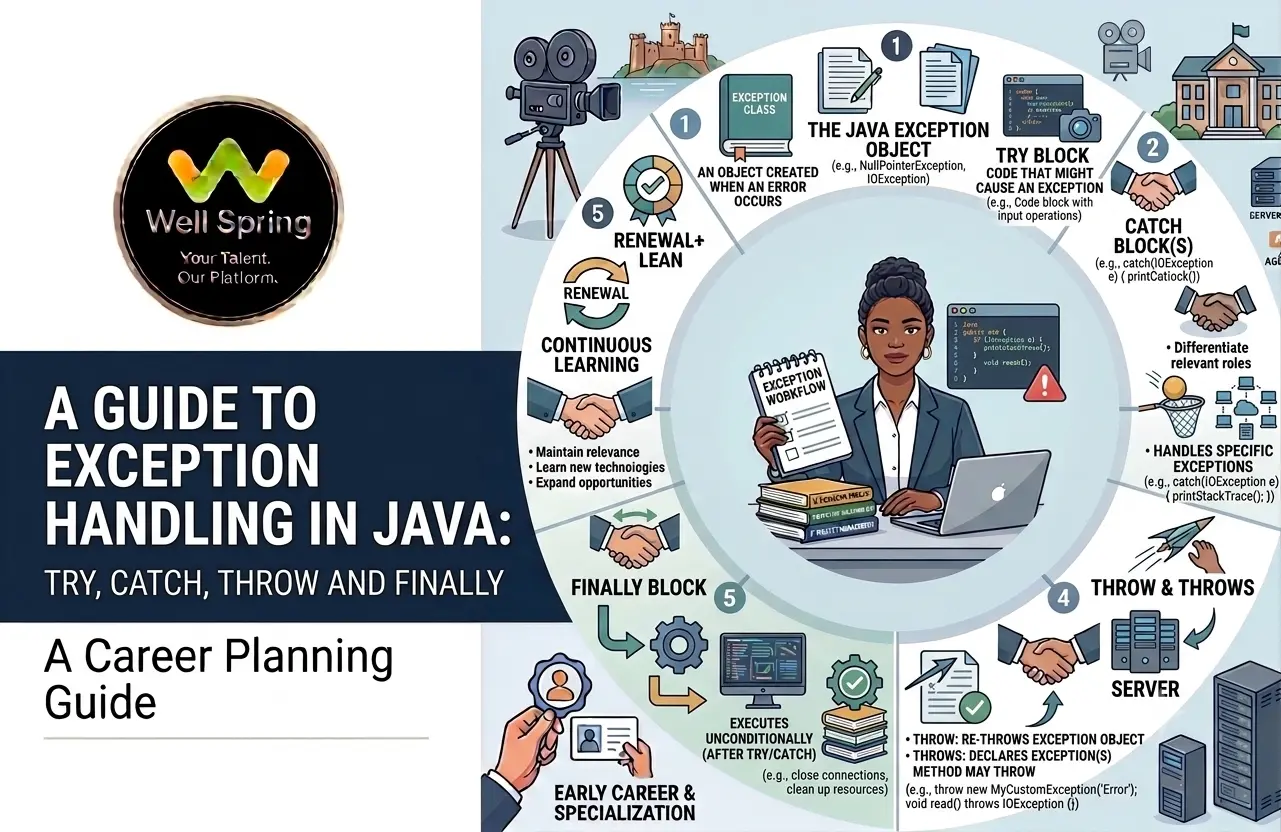
Programs do not always execute exactly as expected. A file may not exist, a user may enter invalid data, a network connection may fail, or a program may attempt to access an invalid array position. These unexpected situations can interrupt normal program execution.
Java provides a structured mechanism called exception handling in Java to detect and manage such runtime problems without allowing the entire application to fail unexpectedly.
The most commonly used keywords are try, catch, finally, throw, and throws. Understanding how these keywords work together is essential for Java developers, whether you are learning the language for the first time, preparing for interviews, or building production applications.
This guide explains the Java exception model from the basics to advanced concepts such as the Java exception hierarchy, checked and unchecked exceptions, and custom exceptions in Java.
Exception handling in Java is a mechanism for detecting and managing exceptional conditions during program execution. Java primarily uses try to contain risky code, catch to handle an exception, finally for cleanup, throw to explicitly create an exception, and throws to declare that a method may pass an exception to its caller.
An exception is an event that disrupts the normal flow of a program during execution.
For example:
int result = 10 / 0;
This statement attempts to divide an integer by zero. Java cannot complete the operation and throws an ArithmeticException.
Without appropriate handling, the program may terminate at that point.
Exception handling allows a developer to define what should happen when such an exceptional condition occurs.
try {
// Code that may cause an exception
} catch (Exception e) {
// Code that handles the exception
} finally {
// Cleanup code
}
The important idea is that exception handling separates normal program logic from error-handling logic.
Good exception handling helps applications behave predictably when something goes wrong.
1. Prevents unexpected termination
Instead of allowing an exception to terminate a program immediately, developers can handle the situation appropriately.
2. Improves reliability
Applications can recover from some failures or provide a controlled response.
3. Makes debugging easier
Exception information can help developers identify where and why a problem occurred.
4. Separates error handling from normal logic
A method can focus on its primary responsibility while exceptions are handled separately.
5. Supports meaningful error messages
Instead of exposing confusing technical failures, applications can provide useful feedback.
For example:
Invalid age. Please enter a value between 18 and 60.
is more useful to a user than an unexplained stack trace.
The basic flow is:
Risky code
↓
Exception occurs
↓
Java creates/throws an exception object
↓
Matching catch block is searched
↓
Handler executes
↓
Program continues according to the control flow
Consider:
public class Example {
public static void main(String[] args) {
try {
int result = 10 / 0;
System.out.println(result);
} catch (ArithmeticException e) {
System.out.println("Cannot divide by zero.");
}
System.out.println("Program continues.");
}
}
Output:
Cannot divide by zero.
Program continues.
The statement after the failing operation inside the try block is skipped. Execution then moves to the matching catch block.
The try and catch blocks form the foundation of exception handling.
The try block contains code that may generate an exception.
try {
int number = 10 / 0;
}
A try block cannot normally appear alone. It must be followed by at least one catch block or a finally block.
The catch block specifies how a particular exception should be handled.
catch (ArithmeticException e) {
System.out.println("Division by zero is not allowed.");
}
Here:
public class DivisionExample {
public static void main(String[] args) {
int a = 20;
int b = 0;
try {
int result = a / b;
System.out.println(result);
} catch (ArithmeticException e) {
System.out.println("Cannot divide by zero.");
}
}
}
The finally block is generally used for cleanup operations that should occur after the try/catch processing.
Example:
try {
System.out.println("Opening resource...");
} catch (Exception e) {
System.out.println("An error occurred.");
} finally {
System.out.println("Cleanup operation.");
}
A finally block can be used with:
For example:
try {
System.out.println("Processing...");
} finally {
System.out.println("Cleanup.");
}
Historically, developers commonly used finally for resource cleanup such as closing streams or database-related resources.
For resources that implement AutoCloseable, modern Java generally prefers try-with-resources, which handles closing automatically.
Do not treat finally as an absolute guarantee that code will execute in every conceivable situation. Situations such as abrupt JVM termination can prevent normal completion.
Although throw and throws look similar, they serve different purposes.
The throw keyword is used to explicitly throw a specific exception object.
throw new IllegalArgumentException("Age cannot be negative.");
Example:
public static void checkAge(int age) {
if (age < 0) {
throw new IllegalArgumentException("Age cannot be negative.");
}
System.out.println("Valid age.");
}
Here, the programmer explicitly decides when the exception should be created and thrown.
Syntax
throw new ExceptionType("message");
The throws keyword is used in a method declaration to indicate that the method may propagate specified exceptions to its caller.
public void readFile() throws IOException {
// File operations
}
The method is telling its caller that an IOException may need to be handled or further declared.
Example
import java.io.IOException;
public class FileExample {
public static void readFile() throws IOException {
// File operation that may throw IOException
}
}
|
throw |
throws |
|
Used to explicitly throw an exception |
Used to declare possible exceptions |
|
Appears inside a method/block |
Appears in a method declaration |
|
Throws an exception object |
Lists exception types |
|
Controls a specific throwing point |
Communicates possible propagation |
Simple memory trick
throw = actually throw
throws = declare that throwing may happen
Understanding the Java exception hierarchy helps explain how exceptions are organised.
At the top is:
Object
|
Throwable
|
+-------------------+
| |
Error Exception
|
+------+------+
| |
RuntimeException Other Exceptions
Throwable is the superclass for objects that can be thrown by Java's exception mechanism.
It has two major branches:
Error represents serious problems that applications generally should not try to handle as ordinary application exceptions.
Examples include:
These generally indicate serious JVM or environment-level conditions.
Exception represents conditions that applications may reasonably need to handle.
Examples include:
RuntimeException is a subclass of Exception.
Common examples include:
This hierarchy is important because Java uses inheritance when matching catch blocks.
For example:
catch (Exception e)
can catch many exception types derived from Exception.
One of the most important concepts in Java exception handling is the distinction between checked and unchecked exceptions in Java.
Checked exceptions are exceptions that the compiler requires the program to account for, typically by:
Examples include:
Example:
import java.io.IOException;
public void loadData() throws IOException {
// Operation that may cause IOException
}
The compiler checks that the exception is handled or declared appropriately.
Unchecked exceptions are generally represented by RuntimeException and its subclasses.
Examples include:
NullPointerException
ArithmeticException
IllegalArgumentException
NumberFormatException
The compiler does not require developers to catch or declare them.
Example:
int value = 10 / 0;
This can produce an ArithmeticException, but Java does not require:
try {
// ...
} catch (ArithmeticException e) {
// ...
}
just to satisfy the compiler.
|
Feature |
Checked |
Unchecked |
|
General base |
Exception subclasses excluding RuntimeException |
RuntimeException subclasses |
|
Compiler requires handling/declaration? |
Yes |
No |
|
Often associated with |
Recoverable/external conditions |
Programming or validation errors |
|
Example |
IOException |
NullPointerException |
This distinction is useful, but developers should avoid thinking of checked exceptions as automatically “good” and unchecked exceptions as automatically “bad.” The appropriate choice depends on the situation and API design.
Knowing common exceptions makes debugging easier.
Occurs when code attempts to use a null reference where an object is required.
String name = null;
System.out.println(name.length());
Can occur during invalid arithmetic operations such as integer division by zero.
int result = 10 / 0;
Occurs when code accesses an invalid array index.
int[] numbers = {10, 20, 30};
System.out.println(numbers[5]);
Occurs when a string cannot be converted into the expected numeric format.
int number = Integer.parseInt("abc");
Used when a method receives an argument that is inappropriate for the method's expected conditions.
public static void setAge(int age) {
if (age < 0) {
throw new IllegalArgumentException("Age cannot be negative.");
}
}
Sometimes standard Java exceptions do not clearly represent a business-specific problem.
In those situations, developers can create custom exceptions in Java.
For example, imagine an application that allows account withdrawals but requires a sufficient balance.
A custom exception could communicate that business condition clearly.
class InsufficientBalanceException extends Exception {
public InsufficientBalanceException(String message) {
super(message);
}
}
The exception can then be used:
public class BankAccount {
private double balance = 1000;
public void withdraw(double amount)
throws InsufficientBalanceException {
if (amount > balance) {
throw new InsufficientBalanceException(
"Insufficient account balance."
);
}
balance -= amount;
}
}
They can make business rules easier to understand.
Compare:
throw new Exception("Error");
with:
throw new InsufficientBalanceException(
"Insufficient account balance."
);
The second communicates the problem much more clearly.
Extending Exception creates a checked exception:
class InvalidOrderException extends Exception {
public InvalidOrderException(String message) {
super(message);
}
}
Extending RuntimeException creates an unchecked exception:
class InvalidOrderException extends RuntimeException {
public InvalidOrderException(String message) {
super(message);
}
}
The choice should depend on the API's intended error-handling model and the nature of the condition.
A single try block can have multiple catch blocks for different exception types.
try {
int[] numbers = {10, 20, 30};
System.out.println(numbers[5]);
} catch (ArithmeticException e) {
System.out.println("Arithmetic error.");
} catch (ArrayIndexOutOfBoundsException e) {
System.out.println("Invalid array index.");
}
Java evaluates the handlers according to the exception type.
This is important:
try {
// Code
} catch (Exception e) {
// General handler
} catch (ArithmeticException e) {
// Invalid: unreachable
}
The second handler is unreachable because Exception can already catch ArithmeticException.
Instead:
try {
// Code
} catch (ArithmeticException e) {
// Specific handler
} catch (Exception e) {
// General handler
}
Java also supports handling multiple unrelated exception types with a single catch.
try {
// Risky code
} catch (IOException | NumberFormatException e) {
System.out.println("Operation failed: " + e.getMessage());
}
This is useful when different exceptions require the same response.
For resources such as files, streams, and other objects implementing AutoCloseable, Java provides try-with-resources.
Example:
import java.io.BufferedReader;
import java.io.FileReader;
import java.io.IOException;
public class FileReaderExample {
public static void main(String[] args) {
try (BufferedReader reader =
new BufferedReader(new FileReader("data.txt"))) {
System.out.println(reader.readLine());
} catch (IOException e) {
System.out.println("Unable to read the file.");
}
}
}
The resource declared inside the parentheses is automatically closed when the try statement completes.
This is generally preferable to manually closing resources in a finally block because it reduces boilerplate and handles resource closure more reliably.
An exception does not always have to be handled where it occurs.
If a method does not handle an exception, it can propagate to its caller.
Consider:
public static void methodA() {
methodB();
}
public static void methodB() {
methodC();
}
public static void methodC() {
int result = 10 / 0;
}
The exception begins in methodC() and can propagate through the call stack until a suitable handler is found.
A caller can handle it:
public static void methodA() {
try {
methodB();
} catch (ArithmeticException e) {
System.out.println("Arithmetic problem handled.");
}
}
This is known as exception propagation.
1. Catch specific exceptions
Prefer:
catch (NumberFormatException e)
when you know the specific problem.
Avoid unnecessarily broad handling such as:
catch (Exception e)
unless there is a clear reason.
2. Do not silently ignore exceptions
Avoid:
catch (Exception e) {
}
An empty handler can hide important failures.
3. Provide meaningful messages
A useful exception message can significantly improve troubleshooting.
throw new IllegalArgumentException(
"Age must be greater than or equal to 18."
);
4. Do not use exceptions for ordinary control flow
Exceptions are designed for exceptional conditions, not routine decisions that can be handled normally.
5. Preserve useful exception information
When wrapping an exception, retain the original cause when appropriate:
throw new RuntimeException(
"Unable to process customer data.",
e
);
This preserves the original exception as the cause.
6. Clean up resources correctly
Prefer try-with-resources for AutoCloseable resources.
7. Avoid catching Error casually
Serious JVM-level errors generally should not be handled like ordinary application exceptions.
8. Design meaningful custom exceptions
Use custom exceptions when a domain-specific condition deserves a clear and identifiable type.
Using a generic catch for everything
catch (Exception e)
can hide the distinction between different failure conditions.
Printing a stack trace and continuing blindly
A stack trace can be useful during development, but production error handling should consider what the application should actually do.
Catching an exception too early
Sometimes an exception should propagate to a higher layer that has enough context to handle it properly.
Using throw and throws interchangeably
They perform different jobs.
Forgetting checked-exception requirements
If a method can propagate a checked exception, it generally needs to handle or declare it.
Creating unnecessary custom exceptions
Do not create a new exception class for every small error. Use standard exceptions when they adequately communicate the problem.
Returning misleading fallback values
Silently returning 0, null, or an empty string after a serious failure can make the underlying problem harder to detect.
Practical Example: Student Result Validation
Consider a program that validates a student's mark.
class InvalidMarkException extends Exception {
public InvalidMarkException(String message) {
super(message);
}
}
Now create a validation method:
public class StudentResult {
public static void validateMark(int mark)
throws InvalidMarkException {
if (mark < 0 || mark > 100) {
throw new InvalidMarkException(
"Mark must be between 0 and 100."
);
}
System.out.println("Valid mark: " + mark);
}
public static void main(String[] args) {
try {
validateMark(120);
} catch (InvalidMarkException e) {
System.out.println(e.getMessage());
}
}
}
This single example demonstrates how throw, throws, custom exceptions, and catch can work together.
These terms are sometimes used interchangeably, but they are not identical.
Exception handling in Java refers specifically to Java's mechanism for dealing with objects in the Throwable hierarchy, particularly application-level exceptions.
Error handling is a broader concept that can include:
Exception handling is therefore one part of a larger error-management strategy.
Understanding exception handling in Java is essential for writing reliable and maintainable applications. The core concepts try, catch, finally, throw, and throws provide different mechanisms for detecting, handling, cleaning up after, and propagating exceptional conditions.
Once you understand the Java exception hierarchy and the difference between checked and unchecked exceptions, more advanced concepts such as custom exceptions, exception propagation, and try-with-resources become much easier to understand.
The best way to learn exception handling is to practise it with real scenarios: invalid input, file operations, database interactions, API calls, and business-rule validation. The goal is not simply to prevent errors from appearing, but to make application failures predictable, understandable, and appropriately handled.

31 Oct 2026
31 Oct 2026
30 Oct 2026
30 Oct 2026
29 Oct 2026
Exception handling in Java is a mechanism for detecting and managing exceptional conditions during program execution. It uses constructs such as try, catch, finally, throw, and throws to control how exceptions are handled or propagated.
try contains code that may produce an exception, while catch provides a handler for a matching exception type.
throw is used to explicitly throw an exception object, while throws is used in a method declaration to indicate that the method may propagate one or more exceptions.
The Java exception hierarchy starts with Throwable. Its major subclasses are Error and Exception. RuntimeException is a subclass of Exception and forms the basis for many unchecked exceptions.
Checked exceptions are generally subject to compiler checking and must be handled or declared. Unchecked exceptions are RuntimeException subclasses and do not have that compiler requirement.
Custom exceptions are programmer-defined exception classes created for application-specific or domain-specific conditions. They can extend Exception or RuntimeException depending on the desired exception model.
A finally block normally executes when control leaves the associated try statement, including when an exception is handled or propagated. However, abnormal JVM termination or similar situations can prevent it from completing.
No. Exceptions should be handled at a level where the application can make an appropriate decision. Some exceptions can be allowed to propagate to a caller that has better context for handling them.
We provide IT training, internships, and online learning for students in Trichy and across India.
Can't attend classes in person? Explore online IT training opportunities with Well Spring Talent Solutions, designed to help learners develop practical technology skills from different locations across India.
Get internship updates, IT training news, placement opportunities, and career tips directly to your inbox.
Join our WhatsApp community for internship updates, IT courses, placement support, and latest job opportunities.
Join NowVisit our branches in Tiruchirappalli for IT training and career guidance.
77, C4, St. Pauls Complex,
Pudukottai Main Road, Bharathiyar Salai,
Cantonment, Tiruchirappalli,
Tamil Nadu 620001
2nd Floor, C56, 4th Cross Rd W, opp. Poorvika Mobiles, Thillai Nagar, Tiruchirappalli,
Tamil Nadu 620018
YVD Complex, chatram bus stand, No. 15, Tiruchirappalli,
Tamil Nadu 620002, India
16, 1st Cross Road, Anna Nagar, Tiruchirappalli,
Tamil Nadu 620007