
Introduction
A database often stores related information in separate tables. For example, a college database may keep student details in one table and course details in another. An e-commerce website may store customer information separately from orders, while a company's employee records may be maintained independently from department details.
How can you retrieve related information from these tables in a single query? The answer is SQL joins.
SQL joins allow you to combine rows from two or more tables using a related column or a specified join condition. Instead of retrieving information separately and connecting it manually, you can use a join to produce a meaningful result directly from the database.
Understanding SQL joins with examples is an essential skill for beginners learning database management, backend development, data analysis, and reporting. This guide explains the main types of SQL joins using simple tables, practical queries, expected results, and common mistakes to avoid.
Quick Answer: What Is an SQL Join?
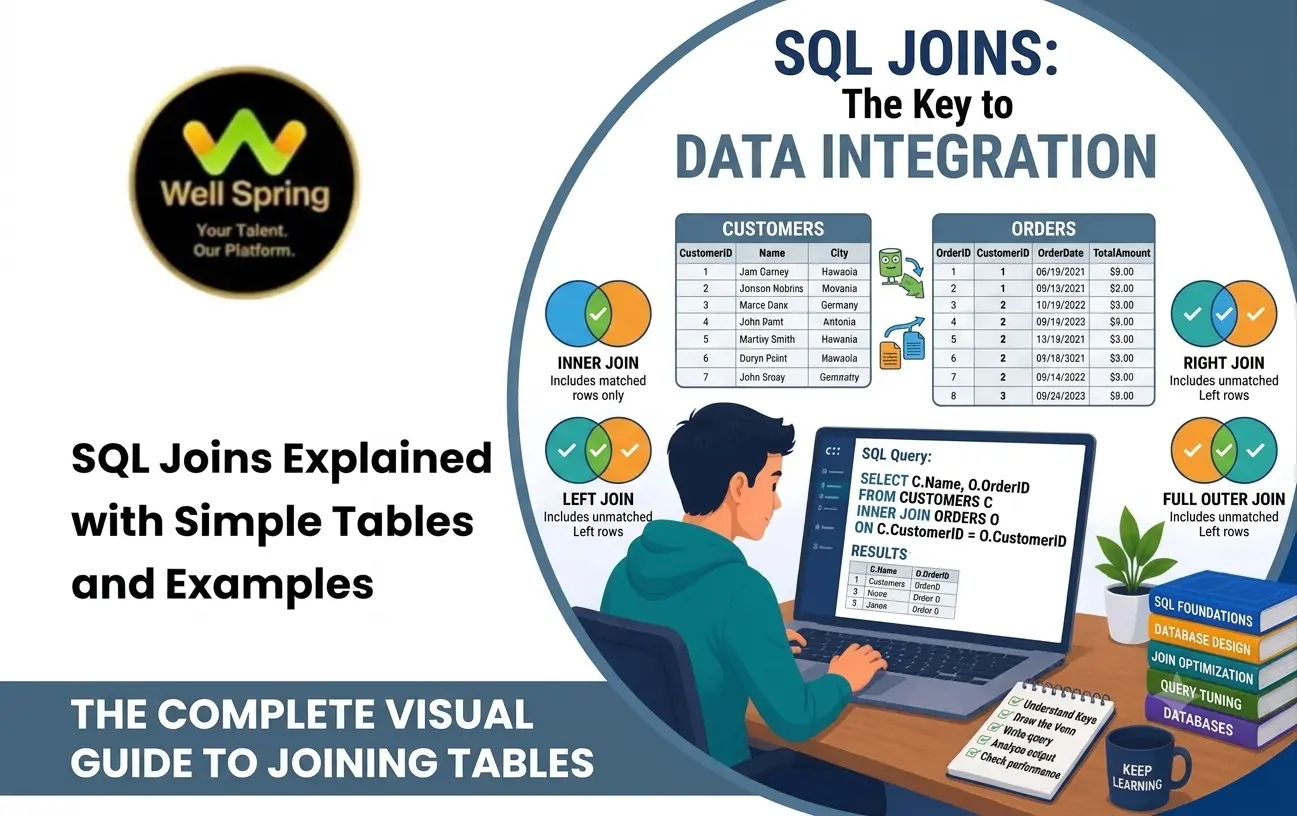
An SQL join combines related rows from multiple tables based on a specified condition. The main join types are INNER JOIN, LEFT JOIN, RIGHT JOIN, and FULL OUTER JOIN. An inner join returns matching rows, a left join preserves every row from the left table, a right join preserves every row from the right table, and a full outer join preserves rows from both tables, including unmatched rows.
1. What Are SQL Joins?
An SQL join is an operation that retrieves related information from separate database tables. The relationship is usually established through a shared column, such as department_id, customer_id, or order_id.
Consider a database containing two tables:
- An Employees table stores employee IDs, names, and department IDs.
- A Departments table stores department IDs and department names.
If you want to display each employee's name alongside the department name, you can join these tables using their common department_id column.
A basic SQL join looks like this:
SELECT
    e.employee_name,
    d.department_name
FROM Employees AS e
INNER JOIN Departments AS d
    ON e.department_id = d.department_id;
Here, e and d are table aliases that make the query shorter and easier to read. The ON clause defines the condition used to match rows from the two tables.
The join type determines what happens to rows that do not have a matching record. This distinction is the foundation for understanding the different types of SQL joins.
2. Sample Tables Used in the Examples
To understand the difference between SQL joins, we will use the same two tables throughout the guide.
Employees table
| employee_id | employee_name | department_id |
|---|---|---|
| 101 | Asha | 10 |
| 102 | Bala | 20 |
| 103 | Charan | 30 |
| 104 | Divya | NULL |
Departments table
| department_id | department_name |
|---|---|
| 10 | HR |
| 20 | IT |
| 40 | Finance |
Notice three important details:
- Asha and Bala have department IDs that exist in the Departments table.
- Charan has department ID 30, which does not exist in the Departments table.
- Divya has no department ID, and Finance has no corresponding employee in the Employees table.
These unmatched records make it easier to understand how each join behaves.
3. Types of SQL Joins
The four main join types beginners should understand are:
| Join Type | Rows Returned |
|---|---|
| INNER JOIN | Only rows that match the join condition in both tables. |
| LEFT JOIN | Every row from the left table and matching rows from the right table. |
| RIGHT JOIN | Every row from the right table and matching rows from the left table. |
| FULL OUTER JOIN | Every row from both tables, matching rows where possible. |
Two additional concepts are cross joins and self joins. These are useful for particular data relationships and will be covered later.
The important point is that joins do not all return the same rows. Choosing the correct join depends on the question you want the database to answer.
4. SQL INNER JOIN Example
An INNER JOIN returns only records that satisfy the join condition in both tables. If a row has no match, it is excluded from the result.
Suppose you want to list employees who belong to departments recorded in the database.
SQL query
SELECT
    e.employee_id,
    e.employee_name,
    d.department_name
FROM Employees AS e
INNER JOIN Departments AS d
    ON e.department_id = d.department_id;
Result
| employee_id | employee_name | department_name |
|---|---|---|
| 101 | Asha | HR |
| 102 | Bala | IT |
Asha matches department 10, and Bala matches department 20. Charan is excluded because department 30 does not exist in the Departments table. Divya is excluded because her department ID is NULL. Finance is excluded because no employee matches department 40.
When should you use INNER JOIN?
Use an inner join when you need records that have a matching relationship in both tables.
Common examples include:
- Displaying orders with their matching customer details.
- Listing employees who belong to recognised departments.
- Retrieving products that have matching category records.
- Generating reports that require related records to exist in both tables.
An inner join is often the simplest starting point when learning SQL join queries for beginners.
5. SQL LEFT JOIN Example
A LEFT JOIN, also known as a left outer join, returns every row from the left table and any matching rows from the right table. When no match exists, columns from the right table contain NULL.
Suppose you want to list every employee, including employees who do not currently belong to a department recorded in the database.
SQL query
SELECT
    e.employee_id,
    e.employee_name,
    e.department_id,
    d.department_name
FROM Employees AS e
LEFT JOIN Departments AS d
    ON e.department_id = d.department_id;
Result
| employee_id | employee_name | department_id | department_name |
|---|---|---|---|
| 101 | Asha | 10 | HR |
| 102 | Bala | 20 | IT |
| 103 | Charan | 30 | NULL |
| 104 | Divya | NULL | NULL |
All four employees appear in the result. Charan's department ID does not match any department, and Divya has no department ID. Both employees are retained because Employees is the left table.
A useful LEFT JOIN variation
You can use a left join to find employees without a matching department.
SELECT
    e.employee_id,
    e.employee_name
FROM Employees AS e
LEFT JOIN Departments AS d
    ON e.department_id = d.department_id
WHERE d.department_id IS NULL;
This returns Charan and Divya because neither has a matching department record.
When should you use LEFT JOIN?
A left join is useful when the primary table's records must remain visible, even if related information is missing.
Typical use cases include displaying all customers alongside their orders, listing all products including products without sales, or finding employees whose department details are missing.
6. SQL RIGHT JOIN Example
A RIGHT JOIN, or right outer join, returns every row from the right table and matching rows from the left table. When a right-table row has no match, columns from the left table contain NULL.
Suppose the requirement is to list every department, including departments that do not have an employee assigned.
SQL query
SELECT
    e.employee_id,
    e.employee_name,
    d.department_id,
    d.department_name
FROM Employees AS e
RIGHT JOIN Departments AS d
    ON e.department_id = d.department_id;
Result
| employee_id | employee_name | department_id | department_name |
|---|---|---|---|
| 101 | Asha | 10 | HR |
| 102 | Bala | 20 | IT |
| NULL | NULL | 40 | Finance |
Finance appears even though there is no matching employee. Charan and Divya do not appear because the right table is Departments, and neither of their records matches a department row.
When should you use RIGHT JOIN?
A right join can be useful when you need to preserve all rows from the table written on the right side of the join.
However, many developers rewrite right joins as left joins by reversing the table order. For example, the query above can be expressed as:
SELECT
    e.employee_id,
    e.employee_name,
    d.department_id,
    d.department_name
FROM Departments AS d
LEFT JOIN Employees AS e
    ON d.department_id = e.department_id;
Both queries produce the same matching and unmatched department records under this example's conditions. The second form is often preferred by
teams
that consistently use left joins for readability.
7. SQL FULL OUTER JOIN Example
A FULL OUTER JOIN returns matching records and retains unmatched records from both tables. Where one side has no matching row, its columns appear as NULL.
Suppose you need a complete comparison of employee and department records, including employees whose department IDs are missing from the department table and departments that have no assigned employees.
SQL query
SELECT
    e.employee_id,
    e.employee_name,
    e.department_id AS employee_department_id,
    d.department_id AS matched_department_id,
    d.department_name
FROM Employees AS e
FULL OUTER JOIN Departments AS d
    ON e.department_id = d.department_id;
Result
| employee_id | employee_name | employee_department_id | matched_department_id | department_name |
|---|---|---|---|---|
| 101 | Asha | 10 | 10 | HR |
| 102 | Bala | 20 | 20 | IT |
| 103 | Charan | 30 | NULL | NULL |
| 104 | Divya | NULL | NULL | NULL |
| NULL | NULL | NULL | 40 | Finance |
The result preserves all four employees and the unmatched Finance department. The two department ID columns are shown separately so you can see the difference between an employee's recorded department ID and a matching department record.
When should you use FULL OUTER JOIN?
A full outer join is helpful when comparing two data sets and identifying records that exist on either side, including unmatched records.
Common uses include reconciling customer lists from different systems, comparing imported data against existing records, and identifying missing relationships between two tables.
Database compatibility note: PostgreSQL and SQL Server support FULL OUTER JOIN. MySQL does not support the syntax directly, so a full outer join usually needs to be simulated with a LEFT JOIN, a RIGHT JOIN, and UNION or UNION ALL with appropriate duplicate handling. Check your database engine before using this query.
8. Other Useful Join Types
CROSS JOIN
A CROSS JOIN returns every possible combination of rows from two tables. It does not require a matching key.
For example:
SELECT
    e.employee_name,
    d.department_name
FROM Employees AS e
CROSS JOIN Departments AS d;
With four employee rows and three department rows, the result contains 12 combinations. This can be useful for generating combinations, but it can also produce unexpectedly large results when tables contain many rows.
SELF JOIN
A self join joins a table to itself. It is useful when records within one table have relationships with other records in that same table.
For example, suppose an Employees table also contains a manager_id column that stores another employee's ID.
SELECT
    e.employee_name AS employee,
    m.employee_name AS manager
FROM Employees AS e
LEFT JOIN Employees AS m
    ON e.manager_id = m.employee_id;
Here, e represents the employee record and m represents the manager record. A left join keeps employees whose manager is missing or not assigned, with the manager's name appearing as NULL.
The example assumes the table includes the manager_id column; that column is not present in the earlier sample data.
9. Difference Between SQL Joins
Choosing a join becomes easier when you start with the question you want to answer.
| Requirement | Suitable Join | Reason |
|---|---|---|
| Show employees with matching departments only. | INNER JOIN | Unmatched employee and department records are excluded. |
| Show every employee, even without department details. | LEFT JOIN | All employee records are retained. |
| Show every department, even without employees. | RIGHT JOIN | All department records are retained. |
| Show every employee and every department, whether matched or not. | FULL OUTER JOIN | Unmatched records from both tables are retained. |
| Generate every employee-department combination. | CROSS JOIN | Every row from one table combines with every row from the other. |
| Compare employees with their managers in the same table. | SELF JOIN | The table is joined to another instance of itself. |
Remember that the left and right tables are determined by their positions in the query. If you change the table order, you may also change which records are preserved by a left or right join.
10. Common SQL Join Mistakes
Forgetting the join condition
For example:
SELECT
    e.employee_name,
    d.department_name
FROM Employees AS e
JOIN Departments AS d;
In database systems that permit this form, omitting the ON condition can produce a Cartesian product rather than the intended relationship. Always specify the join condition when you want related records to match.
Joining on the wrong column
Joining employee names to department names, or using unrelated IDs, can produce incorrect results. Use columns that represent the intended relationship and confirm that the data types and business rules are compatible.
Filtering away unmatched rows unintentionally
Consider this query:
SELECT
    e.employee_name,
    d.department_name
FROM Employees AS e
LEFT JOIN Departments AS d
    ON e.department_id = d.department_id
WHERE d.department_name = 'HR';
The WHERE condition removes rows where the department name is NULL, so the result no longer includes all employees. This may be correct if you want only HR employees, but it defeats the purpose of retaining unmatched employees.
When you need to preserve all left-side rows while restricting which right-side rows may match, consider placing the appropriate condition in the ON clause instead.
Using SELECT * in every query
Selecting every column may create duplicate or confusing column names and retrieve data you do not need. Explicitly list the columns required for the result, especially in reports and application queries.
Assuming NULL means zero or an empty string
NULL represents missing or unknown data, not the numeric value zero and not necessarily an empty string. Use IS NULL or IS NOT NULL when checking for missing values.
11. SQL Join Best Practices
- Understand the data relationship before writing the query. Identify the primary table, the related table, and the columns that connect them.
- Choose the join based on the required output. Decide whether unmatched rows should be excluded, retained from one side, or retained from both sides.
- Use clear table aliases. Short aliases such as e and d make multi-table queries easier to read when used consistently.
- Select only the columns you need. This makes the result clearer and avoids unnecessary data retrieval.
- Check for duplicate matches. If a join key is not unique, one row may match multiple rows and produce more output records than expected.
- Test with unmatched records. Include cases where keys are missing or have no corresponding record so that the query's behaviour is understood.
- Use indexes where appropriate. Indexes on join columns can improve query performance, depending on table size, selectivity, database engine, and query plan.
- Review the execution plan for large queries. Database tools can show how the engine performs the join and whether a different index or query structure may help.
- Check database compatibility. SQL features and supported join syntax can differ across PostgreSQL, MySQL, SQL Server, SQLite, and other database systems.
Conclusion
SQL joins are essential for retrieving meaningful information from relational databases. By understanding how INNER JOIN, LEFT JOIN, RIGHT JOIN, and FULL OUTER JOIN handle matching and unmatched rows, you can choose the correct query for different data requirements.
Start with two small tables, predict the expected result, execute the query, and compare the output with your prediction. Then practise with real relationships such as customers and orders, employees and departments, or products and categories. This approach helps build a strong foundation for database querying and backend development.
For learners developing practical programming and database skills, Well Spring Talent Solutions can be a relevant place to explore training opportunities. Practising these SQL join queries alongside database design, filtering, grouping, and subqueries will help you become more confident in working with relational data.