Blog Details
Home Blog Details

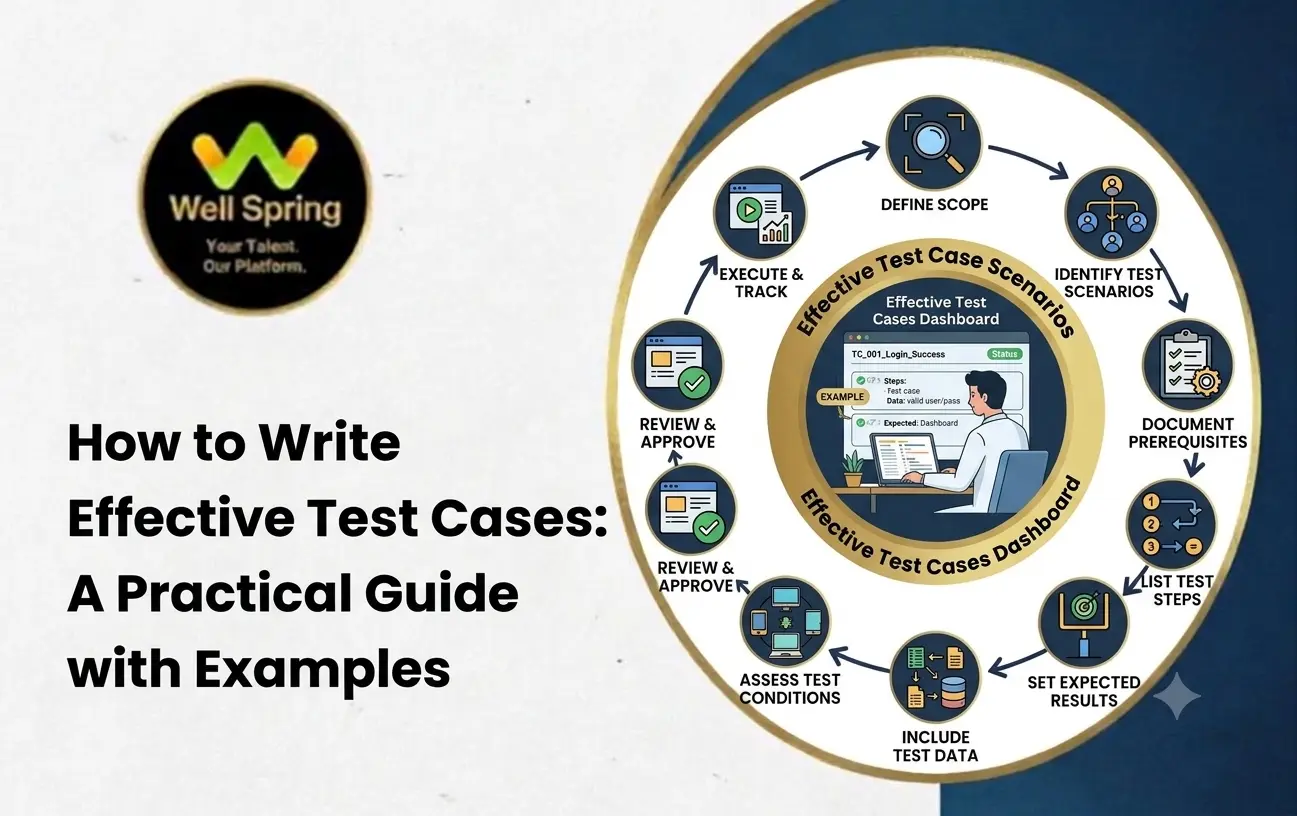
Writing effective test cases is an essential skill in software testing. Well-written test cases help testers verify whether an application works as expected, identify defects, and ensure that software meets its functional and business requirements. They also provide a structured approach to testing, making it easier for teams to repeat tests and maintain consistent quality throughout the software development lifecycle.
For beginners, learning how to write test cases involves understanding the requirements, identifying test scenarios, defining test steps, specifying expected results, and documenting the outcomes. This guide explains how to write test cases in software testing, explores common test case design techniques, and provides practical examples to help you get started.
A test case in software testing is a documented set of conditions, inputs, execution steps, and expected results used to verify a specific functionality of an application.
Testers use test cases to check whether an application behaves according to its requirements. Each test case focuses on a particular condition or behavior, helping testers identify defects and confirm that the software functions correctly.
For example, when testing a login page, a test case might verify whether a registered user can log in using a valid email address and password.
A typical test case includes:
Test Case ID
Test Case Title
Test Scenario
Preconditions
Test Data
Test Steps
Expected Result
Actual Result
Status
Comments or Remarks
A clear test case allows another tester to understand and execute the same test without needing additional explanations.
Test case writing plays an important role in software quality assurance because it provides a systematic approach to verifying application functionality.
Well-designed test cases help testers verify different application features, user interactions, input conditions, and possible error scenarios.
Test cases compare actual application behavior with expected results. Any difference between them may indicate a defect that needs investigation.
Documented test cases allow testers to repeat the same tests during regression testing, maintenance, and future software releases.
Test cases provide a common reference for developers, testers, business analysts, and other stakeholders. Everyone can understand what needs to be tested and what results are expected.
When developers modify existing functionality, previously written test cases help verify that the changes have not introduced new defects into other parts of the application.
Test case documentation records what was tested, how it was tested, and whether the results met the requirements. This information is useful for test reviews, audits, and future maintenance.
Learning how to write test cases requires a structured process. The following steps can help beginners create clear, complete, and reusable test cases.
Before writing test cases, understand the application's functional requirements, business rules, and expected behavior.
Requirements may come from a Software Requirements Specification (SRS), user stories, acceptance criteria, design documents, or discussions with stakeholders.
For example, a login requirement might state that registered users must be able to log in using a valid email address and password.
Based on this requirement, testers can identify scenarios involving valid credentials, invalid passwords, empty fields, and unregistered email addresses.
A test scenario describes a functionality or situation that needs to be tested. It provides a high-level view of what should be verified.
For a login page, possible test scenarios include:
Verify login with valid credentials.
Verify login with an incorrect password.
Verify login with an unregistered email address.
Verify login when the email field is empty.
Verify login when the password field is empty.
Verify login when both fields are empty.
Verify password masking.
Verify the password recovery link.
Each scenario can be expanded into one or more detailed test cases.
Preconditions describe the conditions that must be satisfied before executing a test case.
For example, a successful login test may require:
The application is accessible.
A registered user account exists.
The account is active.
The tester knows the correct login credentials.
Clearly defined preconditions help testers execute test cases consistently.
Test data consists of the inputs required to execute a test case.
For a login feature, test data may include:
Valid email address and password
Valid email address and incorrect password
Unregistered email address
Empty email and password fields
Email address with an invalid format
Use approved test accounts and non-sensitive test data wherever possible. Avoid including real user passwords or unnecessary personal information in test documentation.
Test steps describe the actions a tester must perform to execute the test case.
For example:
Open the application.
Navigate to the login page.
Enter a registered email address.
Enter the correct password.
Click the Login button.
Observe the application's response.
Each step should be specific, logically ordered, and easy to follow.
Avoid vague instructions such as "check the login functionality." Instead, explain the exact actions needed to perform the test.
The expected result describes how the application should behave when the test is executed successfully.
For example, after entering valid login credentials, the user should be authenticated and redirected to the appropriate dashboard.
Expected results should be measurable and unambiguous. Instead of writing "the page should work correctly," describe the exact behavior that must occur.
Execute the documented steps in the test environment using the specified test data.
Observe the application's behavior and compare it with the expected result.
If the actual result matches the expected result, the test case can generally be marked as Pass. If the application behaves differently from the expected result, mark it as Fail and investigate the issue.
If the test cannot be executed because of an environment issue, missing dependency, or another blocking condition, record the appropriate status according to the team's testing process.
After execution, document the actual result, test status, and any relevant observations.
For failed test cases, create a defect report containing:
Defect ID
Defect summary
Steps to reproduce
Expected result
Actual result
Environment details
Screenshots or logs, where appropriate
Severity and priority, according to team guidelines
This information helps developers reproduce and investigate the issue.
Review test cases to ensure that they are accurate, complete, understandable, and aligned with the latest requirements.
When application functionality changes, update the related test cases. Remove obsolete steps, revise outdated test data, and add new cases for newly introduced requirements.
Regular maintenance keeps test case documentation useful throughout the software development lifecycle.
A consistent software test case format makes test documentation easier to read, execute, review, and maintain.
Although the exact format varies between organizations and testing tools, most test cases include the following fields.
| Field | Description | Example |
|---|---|---|
| Test Case ID | Unique identifier for the test case | TC_LOGIN_001 |
| Test Case Title | Brief description of the test | Verify login with valid credentials |
| Test Scenario | Functionality being tested | User authentication |
| Preconditions | Conditions required before execution | Registered user account exists |
| Test Data | Inputs used during testing | Valid email and password |
| Test Steps | Actions performed by the tester | Enter credentials and click Login |
| Expected Result | Behavior expected from the application | User is redirected to the dashboard |
| Actual Result | Observed application behavior | User reaches the dashboard |
| Status | Outcome of test execution | Pass |
| Remarks | Additional observations | No issues observed |
The following template can be used when creating test cases in a spreadsheet or test management tool.
| Test Case ID | Test Case Title | Preconditions | Test Steps | Test Data | Expected Result | Actual Result | Status |
|---|---|---|---|---|---|---|---|
| TC_LOGIN_001 | Verify login with valid credentials | Registered user exists | Enter valid credentials and click Login | Valid email and password | User successfully logs in | User reaches dashboard | Pass |
| TC_LOGIN_002 | Verify login with an incorrect password | Registered user exists | Enter registered email, incorrect password, and click Login | Incorrect password | Login is rejected and an appropriate error message appears | Login rejected with error message | Pass |
| TC_LOGIN_003 | Verify login with an unregistered email | Login page is accessible | Enter an unregistered email and a password, then click Login | Unregistered email | Login is rejected with an appropriate message | Login rejected | Pass |
| TC_LOGIN_004 | Verify login with empty fields | Login page is accessible | Leave both fields empty and click Login | Empty values | Required-field validation appears | Required-field validation appears | Pass |
Note: The actual results and statuses above are illustrative examples. In real testing, record the results observed during execution.
Practical examples help beginners understand how to create test cases for different application functionalities.
Test Case ID: TC_LOGIN_001
Test Case Title: Verify login with valid credentials
Preconditions: A registered, active user account exists.
Test Data: Valid email address and password.
Test Steps:
Open the application.
Navigate to the login page.
Enter a valid email address.
Enter the correct password.
Click the Login button.
Expected Result: The application authenticates the user and redirects them to the appropriate dashboard.
Purpose: To verify that authorized users can access the application using valid credentials.
Test Case ID: TC_REG_001
Test Case Title: Verify registration with valid details
Preconditions: The registration page is accessible, and the email address has not already been registered.
Test Data: Valid name, email address, password, and other required registration details.
Test Steps:
Open the registration page.
Enter valid details in all required fields.
Accept the terms and conditions if required.
Click the Register button.
Observe the application's response.
Expected Result: The application creates the account or initiates the required verification process, depending on the specified requirements.
Purpose: To verify that users can complete registration using valid information.
Test Case ID: TC_SEARCH_001
Test Case Title: Verify search using a valid keyword
Preconditions: The application contains searchable records or products.
Test Data: A keyword that matches existing records.
Test Steps:
Open the application.
Navigate to the search feature.
Enter a valid search keyword.
Click Search or press Enter.
Review the displayed results.
Expected Result: The application displays relevant results that match the search criteria.
Purpose: To verify that the search feature returns appropriate results for valid search queries.
Test Case ID: TC_CART_001
Test Case Title: Verify adding a product to the shopping cart
Preconditions: A product is available for purchase.
Test Data: An available product.
Test Steps:
Open the shopping application.
Navigate to an available product.
Select the product.
Click Add to Cart.
Open the shopping cart.
Verify the product details and quantity.
Expected Result: The selected product appears in the shopping cart with the correct details and quantity.
Purpose: To verify that customers can add available products to their shopping carts.
Test Case ID: TC_PWD_001
Test Case Title: Verify password reset for a registered email address
Preconditions: A registered user account exists, and the password recovery feature is available.
Test Data: Registered email address.
Test Steps:
Open the login page.
Click the Forgot Password link.
Enter the registered email address.
Submit the request.
Observe the confirmation message and follow the configured recovery process.
Expected Result: The application processes the password recovery request according to its requirements and displays an appropriate confirmation message.
Purpose: To verify that users can initiate the password recovery process.
Test case design techniques help testers identify meaningful test conditions without creating unnecessary duplicate test cases. These techniques are particularly useful when an application accepts many different input values.
Equivalence partitioning divides input data into groups expected to behave similarly. Testers select representative values from each group instead of testing every possible value.
Example:
Suppose an application accepts ages from 18 to 60.
Possible equivalence partitions are:
Below 18: Invalid
From 18 to 60: Valid
Above 60: Invalid
A tester can select representative values from these groups to verify the application's validation behavior.
Boundary value analysis focuses on the edges of valid and invalid input ranges because errors frequently occur near boundaries.
Example:
For an age field that accepts values from 18 to 60, useful test values include:
17: Just below the minimum
18: Minimum valid value
19: Just above the minimum
59: Just below the maximum
60: Maximum valid value
61: Just above the maximum
These values help verify that the application handles range boundaries correctly.
Decision table testing is useful when application behavior depends on combinations of conditions.
Example:
A login feature may depend on whether the email address and password are valid.
| Email Valid | Password Valid | Expected Behavior |
|---|---|---|
| Yes | Yes | Login succeeds |
| Yes | No | Login is rejected |
| No | Yes | Login is rejected |
| No | No | Login is rejected |
This technique helps testers identify important combinations of inputs and expected outcomes.
State transition testing verifies how an application moves from one state to another when specific events occur.
Example:
An account may move between the following states:
Active
Temporarily locked
Unlocked
A tester can verify whether repeated failed login attempts cause the account to become temporarily locked and whether it returns to an active state according to the specified recovery rules.
This technique is useful for workflows, account management, order processing, and other features with multiple states.
Use case testing verifies application behavior through realistic user workflows.
Example:
For an online shopping application, a test scenario might include:
Log in to the application.
Search for a product.
Add the product to the cart.
Proceed to checkout.
Enter delivery details.
Complete the payment using an approved test payment method.
Verify the order confirmation.
This approach helps testers check whether related application features work together as expected.
Following test case writing best practices helps improve clarity, consistency, test coverage, and maintenance.
A test case title should communicate exactly what is being verified.
Instead of writing "Login Test," use "Verify Login with Valid Credentials."
Each test case should generally verify one primary objective. Avoid combining unrelated validations into a single test case, as this can make failures difficult to identify.
Use simple, specific instructions that another tester can follow without additional clarification.
Expected results should describe observable behavior, such as an error message, page navigation, updated record, or confirmation notification.
Positive test cases verify expected behavior with valid inputs. Negative test cases verify how the application handles invalid inputs, missing information, unauthorized actions, and other error conditions.
Give appropriate attention to features involving authentication, payments, personal information, important business workflows, and frequently used functionality.
Review existing test cases before creating new ones. Similar cases can often be consolidated when they verify the same behavior under equivalent conditions.
Where appropriate, link test cases to requirements, user stories, or acceptance criteria. This helps teams understand which requirements have been tested and identify missing coverage.
Unique and structured test case IDs make it easier to organize and locate test cases.
For example:
TC_LOGIN_001
TC_REG_001
TC_SEARCH_001
TC_CART_001
Application requirements change over time. Regularly review test cases to ensure that their steps, test data, expected results, and preconditions remain accurate.
Beginners sometimes write test cases that are difficult to execute, review, or maintain. Understanding common mistakes can help improve test documentation.
1. Writing vague test steps: Instructions such as "test the page" do not explain what actions the tester should perform.
Solution: Describe each action in a clear, logical sequence.
2. Missing expected results: Without an expected result, testers may struggle to determine whether the application has behaved correctly.
Solution: Define the expected outcome for every test case.
3. Testing only positive scenarios: Testing only valid inputs may leave validation errors and unexpected behaviors undiscovered.
Solution: Include appropriate negative scenarios and boundary conditions.
4. Using incorrect or incomplete test data: Missing or unsuitable test data can prevent consistent execution.
Solution: Specify the required inputs and preconditions clearly.
5. Combining too many objectives: A test case that verifies several unrelated features can make defect investigation more difficult.
Solution: Keep each test case focused on a clear testing objective.
6. Ignoring requirement changes: Outdated test cases may no longer reflect the application's actual requirements.
Solution: Review and update test documentation whenever relevant functionality changes.
7. Recording inaccurate execution results: Marking a test case as passed without verifying the expected behavior reduces the reliability of test reports.
Solution: Record actual results based on observed application behavior.
Testers use different tools to create, organize, execute, and maintain test cases. The appropriate tool depends on the team's workflow, project size, budget, and reporting requirements.
Spreadsheets are useful for beginners and small projects because they allow testers to create test case templates, record execution results, and organize test data.
TestRail provides test case management capabilities that help teams organize test suites, plan test runs, track execution results, and report testing progress.
Jira helps teams manage issues, requirements, and development workflows. Test management integrations can connect test cases and execution results with related development work.
Zephyr provides test management capabilities for organizing test cases, planning test cycles, recording results, and connecting testing activities with development workflows.
Azure Test Plans supports test planning, manual test execution, exploratory testing, and tracking testing progress within the Azure DevOps ecosystem.
For beginners, starting with a spreadsheet can be sufficient to understand test case documentation. As projects grow, dedicated test management tools can provide more structured workflows and reporting.
Learning how to write test cases is an important step toward building a strong foundation in software testing. Effective test cases help verify application functionality, identify defects, improve test coverage, and maintain reliable testing documentation.
By understanding requirements, identifying test scenarios, writing clear execution steps, defining expected results, and applying appropriate test case design techniques, beginners can develop practical testing skills.
Consistent practice with real-world examples such as login pages, registration forms, search features, and shopping carts can help aspiring testers become more confident in designing and documenting test cases.
If you are beginning your software testing journey, focus on understanding the testing process, practising test case writing, and learning how to document and report defects effectively. These skills provide a strong foundation for progressing toward more advanced software testing practices.

22 Nov 2026
21 Nov 2026
21 Nov 2026

19 Nov 2026
19 Nov 2026
To write a test case, understand the requirements, identify a test scenario, define the preconditions and test data, write the execution steps, specify the expected result, and record the actual result and status after execution.
A common software test case format includes a test case ID, title, scenario, preconditions, test data, steps, expected result, actual result, status, and remarks. The exact format varies by project and organization.
A good test case is clear, specific, repeatable, traceable to relevant requirements, and focused on a defined objective. It should also include suitable test data and an unambiguous expected result.
A test scenario describes what functionality or situation needs to be tested at a high level. A test case provides the detailed preconditions, inputs, steps, and expected results required to verify that scenario. For example, "Verify login functionality" is a test scenario, while "Verify login using a registered email address and valid password" is a specific test case.
There is no fixed number of test cases for every feature. The required number depends on the complexity of the functionality, business requirements, risk, input combinations, and expected test coverage.
Positive test cases verify that a feature works with valid inputs and expected conditions. Negative test cases verify that the application handles invalid inputs, missing information, or unexpected conditions appropriately.
Beginners can start with equivalence partitioning and boundary value analysis. They can then learn decision table testing, state transition testing, and use case testing to handle more complex application behavior.
Yes. Suitable test cases can be automated using tools and frameworks such as Selenium, Playwright, and Cypress for web applications. Automation is particularly useful for repeatable regression tests, although some scenarios still require manual testing.
A test case describes the conditions, steps, inputs, and expected results used to verify functionality. A test script is a sequence of instructions, often implemented in code, that can execute a test automatically. The terms may overlap depending on the team's testing process.
Yes. Test case writing helps beginners understand application requirements, develop analytical thinking, identify different test conditions, and communicate testing results clearly. It is a valuable foundational skill for manual testing and software quality assurance roles.
We provide IT training, internships, and online learning for students in Trichy and across India.
We also welcome enquiries from students in these neighbourhoods, towns, and surrounding locations.
Can't attend classes in person? Explore online IT training opportunities with Well Spring Talent Solutions, designed to help learners develop practical technology skills from different locations across India.
Get internship updates, IT training news, placement opportunities, and career tips directly to your inbox.
Join our WhatsApp community for internship updates, IT courses, placement support, and latest job opportunities.
Join Now