Blog Details
Home Blog Details

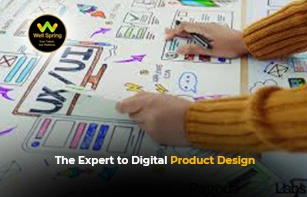
What is UX and UI? User Experience (UX) is the structural blueprint of a digital product, focusing on logic, user research, and how a person feels while solving a problem.
User Interface (UI) is the visual and interactive layer, focusing on typography, colors, and the specific touchpoints a person clicks or swipes.
UX handles functionality and flow; UI handles aesthetics and physical interaction.
When you build a house, UX is the architectural floor plan that dictates where the rooms go so the layout makes logical sense.
UI is the interior design the paint colors, the fixtures, and the cabinet handles that make the house beautiful and usable.
Understanding User Experience (UX): The Logic Layer
User Experience (UX) encompasses every aspect of the end-user's interaction with the company, its services, and its products.
According to the Nielsen Norman Group's foundational definition of User Experience, true UX goes far beyond simply giving customers what they say they want.
Good UX requires merging exact business goals with genuine user needs.
This is achieved through rigorous User Research and mapping out a detailed User Journey Map before any code is written.
By focusing on minimizing Cognitive Load, designers ensure that completing a task requires minimal mental effort from the user.
To achieve this, professionals rely on core user experience design principles.
These principles dictate that a system must provide clear feedback, prevent errors before they happen, and allow users to reverse actions easily.
Information Architecture (IA) plays a massive role here, organizing content so users intuitively know where to find what they need.
Understanding User Interface (UI): The Visual Layer
User Interface (UI) design focuses entirely on the visual surface and interactive elements of a product.
It translates the raw structure of UX into an aesthetically pleasing, fully interactive digital reality.
When designers apply interface design best practices, they prioritize visual hierarchy, ensuring the most critical buttons draw the eye immediately.
UI is heavily rooted in Human-Computer Interaction (HCI). It dictates the specific look of buttons, toggle switches, input fields, and typography.
The Interaction Design Foundation offers excellent guidelines for visual interface design, noting that great UI should feel entirely invisible to the user.
Modern UI also demands a strict adherence to Responsive Web Design, meaning interfaces must adapt seamlessly across mobile phones, tablets, and desktop monitors.
Furthermore, inclusive UI requires passing Accessibility (a11y) standards.
Following global web accessibility standards ensures that people with visual or motor impairments can navigate interfaces using screen readers or keyboard-only inputs.
The Core difference between UX and UI
Understanding the difference between UX and UI is crucial for building effective product teams.
While they work in tandem, they require distinctly different mindsets and deliverables.
A product with great UX but poor UI feels incredibly logical but looks terribly outdated.
Conversely, a product with stunning UI but terrible UX looks beautiful but leaves users frustrated and confused.
Bridging the Gap: The human-centered design process
Exceptional products merge both disciplines using a strict human-centered design process.
This framework relies heavily on Design Thinking a non-linear, iterative approach that challenges assumptions and redefines problems.
The process typically begins with Interaction Design, where teams establish the basic behaviors of the digital product.
Understanding interaction design fundamentals allows teams to define exactly how the system reacts when a user clicks, swipes, or hovers over an element.
From there, teams build a basic model through Prototyping, taking the concept from an abstract idea to a clickable test environment.
Before finalizing the Visual Design, rigorous Usability Testing must occur.
Watching real users navigate your prototype reveals exactly where your logic fails and where your visual hierarchy misleads.
Implementing these iterative User Experience Design Principles ensures that the final product actually solves the core problem rather than just looking good on a portfolio.
Hiring the Right Design Talent for Your Business
Knowing the definitions of these disciplines is only half the battle; the real challenge is finding professionals who can execute them.
Because UX requires high empathy and deep analytical skills, while UI requires meticulous visual precision, finding someone who genuinely excels at both (a "UX/UI Unicorn") is rare.
At Well Spring Talent Solutions, we understand that building a high-performing digital team requires nuance.
As you explore our hiring programs, you'll find that we specialize in sourcing specialized talent tailored precisely to your product's maturity stage.
Whether you need a hardcore UX researcher to untangle complex software or a UI specialist to elevate your brand aesthetics, we connect you with candidates who fit your exact needs.
Furthermore, technical design skills alone don't guarantee success.
We prioritize candidates who can communicate complex design rationale to non-technical stakeholders, as outlined in our analysis on soft skills in the post-pandemic job market.
Ready to elevate your product's user experience? Browse the latest tech design jobs or partner with Well Spring Talent Solutions today to build a design team that drives real business results.

03 Jun 2026
03 Jun 2026
03 Jun 2026

03 Jun 2026
03 Jun 2026
UX (User Experience) focuses on how users interact with a product, while UI (User Interface) deals with the visual design and layout.
UX is about usability and experience, whereas UI is about design elements like colors, buttons, and typography.
Popular tools include Figma, Adobe XD, and Sketch.
Yes, it’s in high demand due to the growth of digital products and user-focused design.
Start with design basics, learn tools, practice projects, and build a strong portfolio.
Get internship updates, IT training news, placement opportunities, and career tips directly to your inbox.
Join our WhatsApp community for internship updates, IT courses, placement support, and latest job opportunities.
Join Now